
Job Costing Software for UK Contractors
The true cost of every job, live, against the tender it was won on.Labour booked to the job daily, purchase orders and subcontracts posting as commitments the moment they are raised, and every invoice matched to its cost code. The CVR (cost value reconciliation) is produced from the same records, with retention tracked per subcontract and applications for payment run in the same platform.

Trusted by construction companies of every size, worldwide


























Actual cost per job, read against the tender it was won on
Job costing software for UK contractors answers the question the monthly CVR (cost value reconciliation) keeps asking: what has this job actually cost, against the numbers it was priced on. Archdesk turns the winning tender into the cost-coded job budget, books site labour to the job daily at cost rates, and posts purchase orders and subcontracts as commitments the moment they are raised. Invoices match against those commitments, retention is tracked per subcontract, and applications for payment run on the same records, so the CVR is produced from the job cost records rather than assembled around them.

Labour hours priced, not just counted
Site timesheets carry cost rates, so labour is booked to the job daily: crew hours become labour cost on the right cost code the day they are worked, not when payroll closes.
Committed before it is spent
Purchase orders and subcontracts post to the job as commitments the moment they are raised, so committed cost is visible per cost code months before the invoice arrives.
The tender sets the baseline
The winning tender becomes the job budget without re-keying, so every actual lands against the lines the job was priced on and margin per line is visible from day one.
Variations priced into the job
Variations carry their cost impact onto the affected cost codes at approval, so scope growth is in the job cost record from day one instead of hiding in the base budget.
True cost feeds the next tender
Every job closes with its complete actual-cost record per cost code, so estimators price the next tender from what jobs really cost. The same records carry the CVR, retention balances and applications for payment, one set of figures from first valuation to final account.

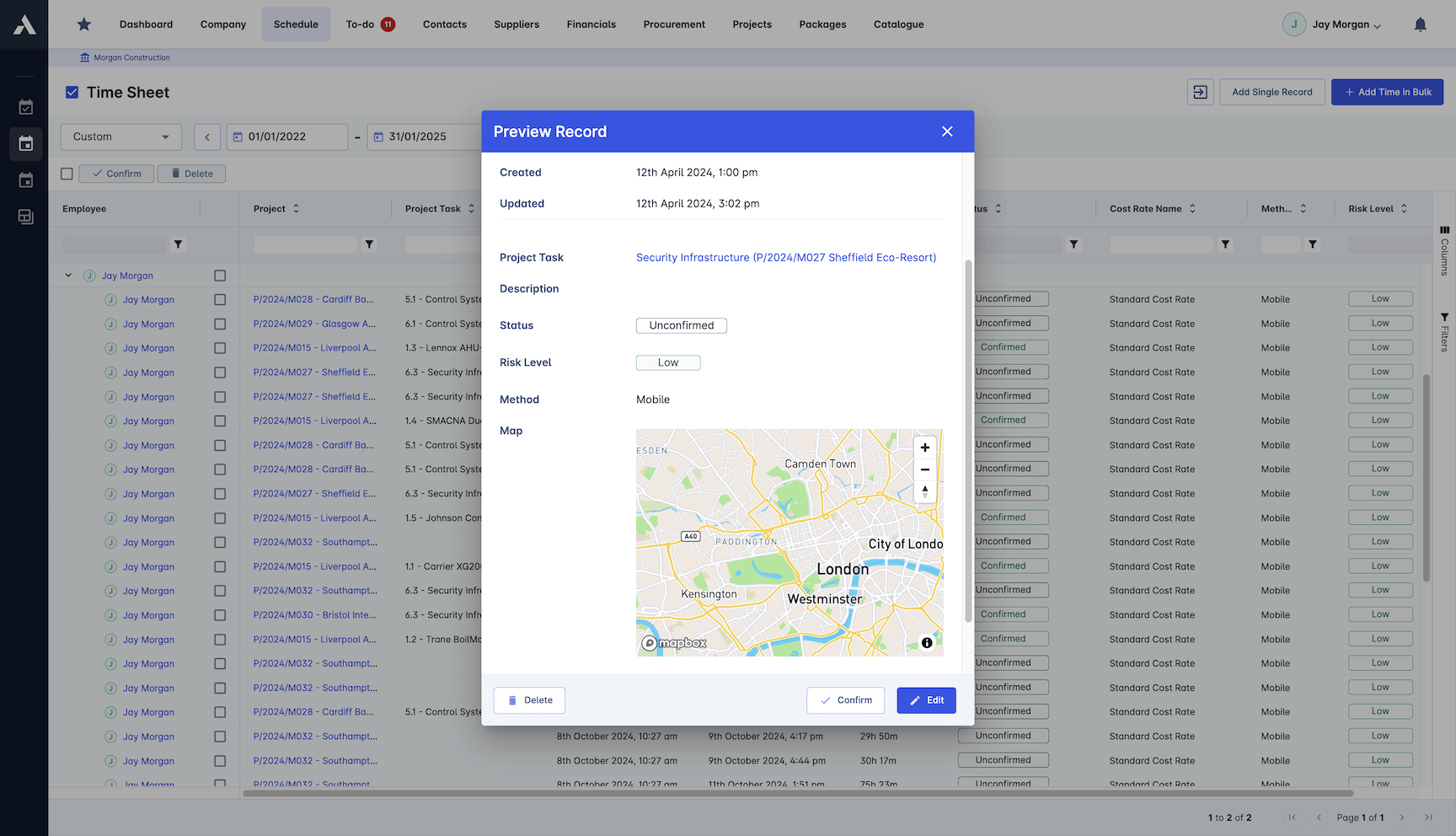
Labour Cost Tracking
Timesheets from site carry cost rates, so hours become labour cost on the right job and cost code the day they are worked, not when payroll closes the month.
Site hours captured against jobs and cost codes
Cost rates applied to recorded hours
Labour cost visible daily per job
Expenses and plant time recorded with the work
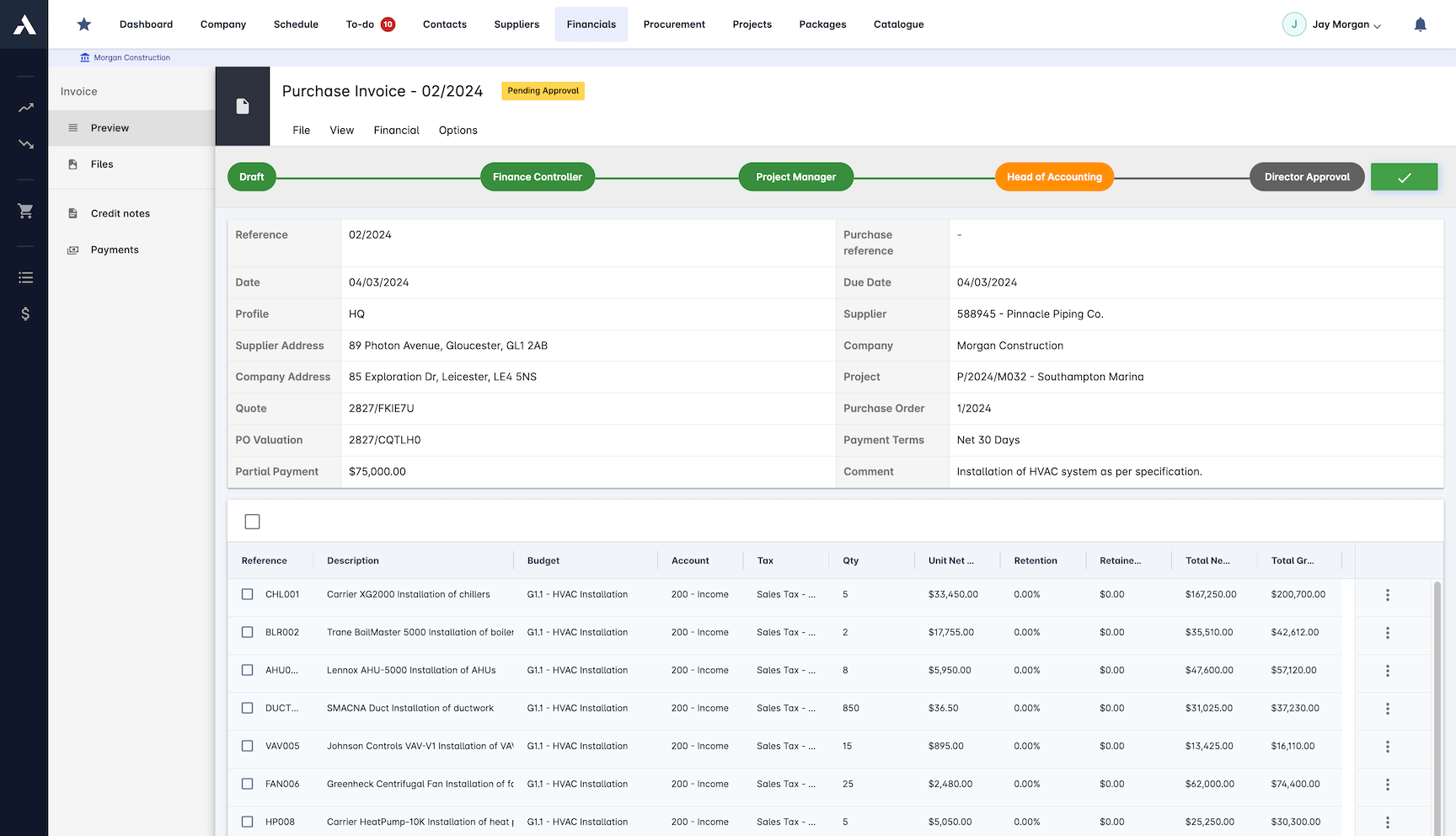
Actuals and Invoice Matching
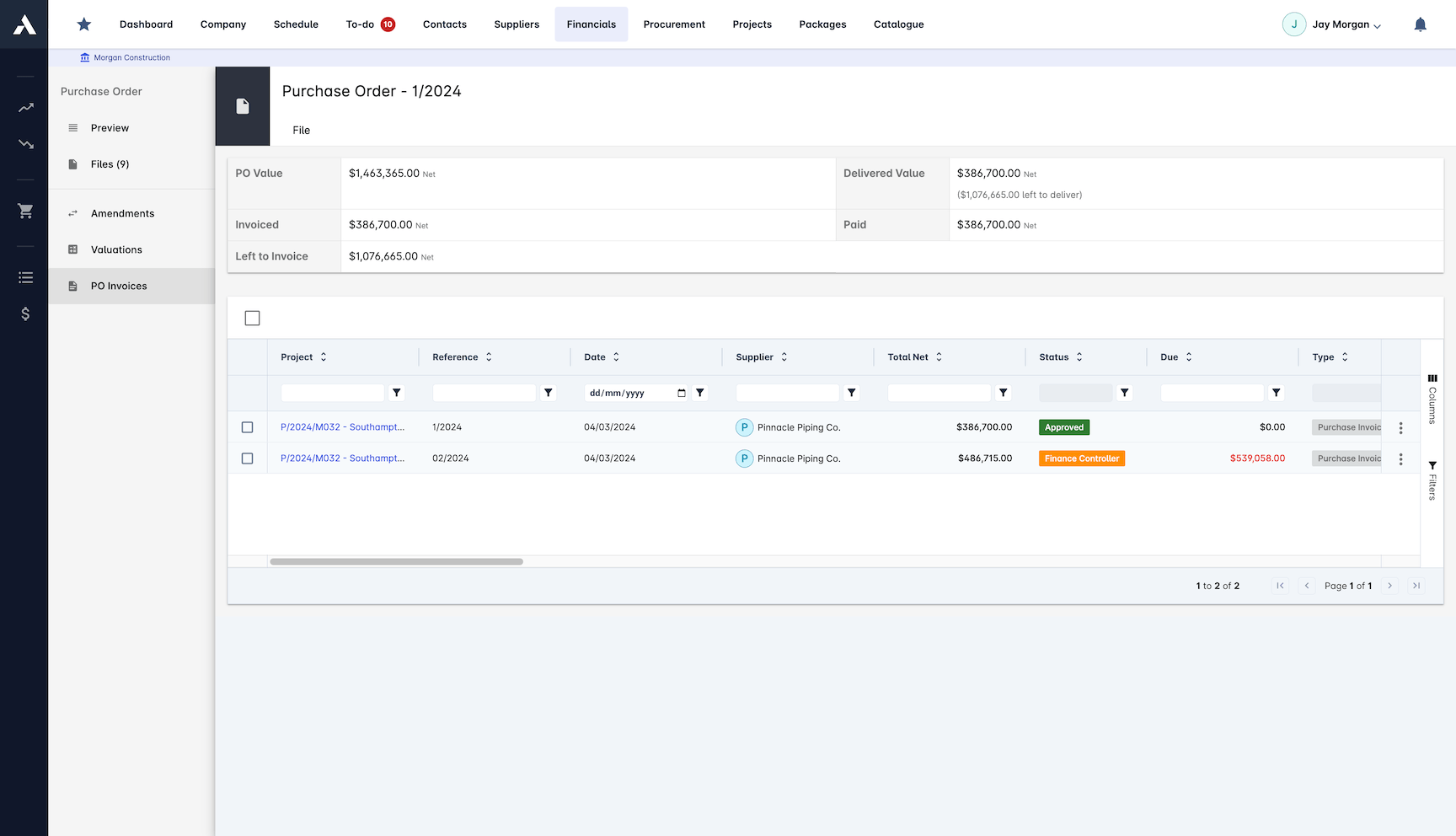
Supplier and subcontractor invoices land against their commitments and cost codes, with retention handled, so actual cost per job is reconciled continuously rather than quarterly.
Invoices matched to purchase orders
Retention tracked per subcontract
Actuals posted to the originating cost code
One record from order to payment
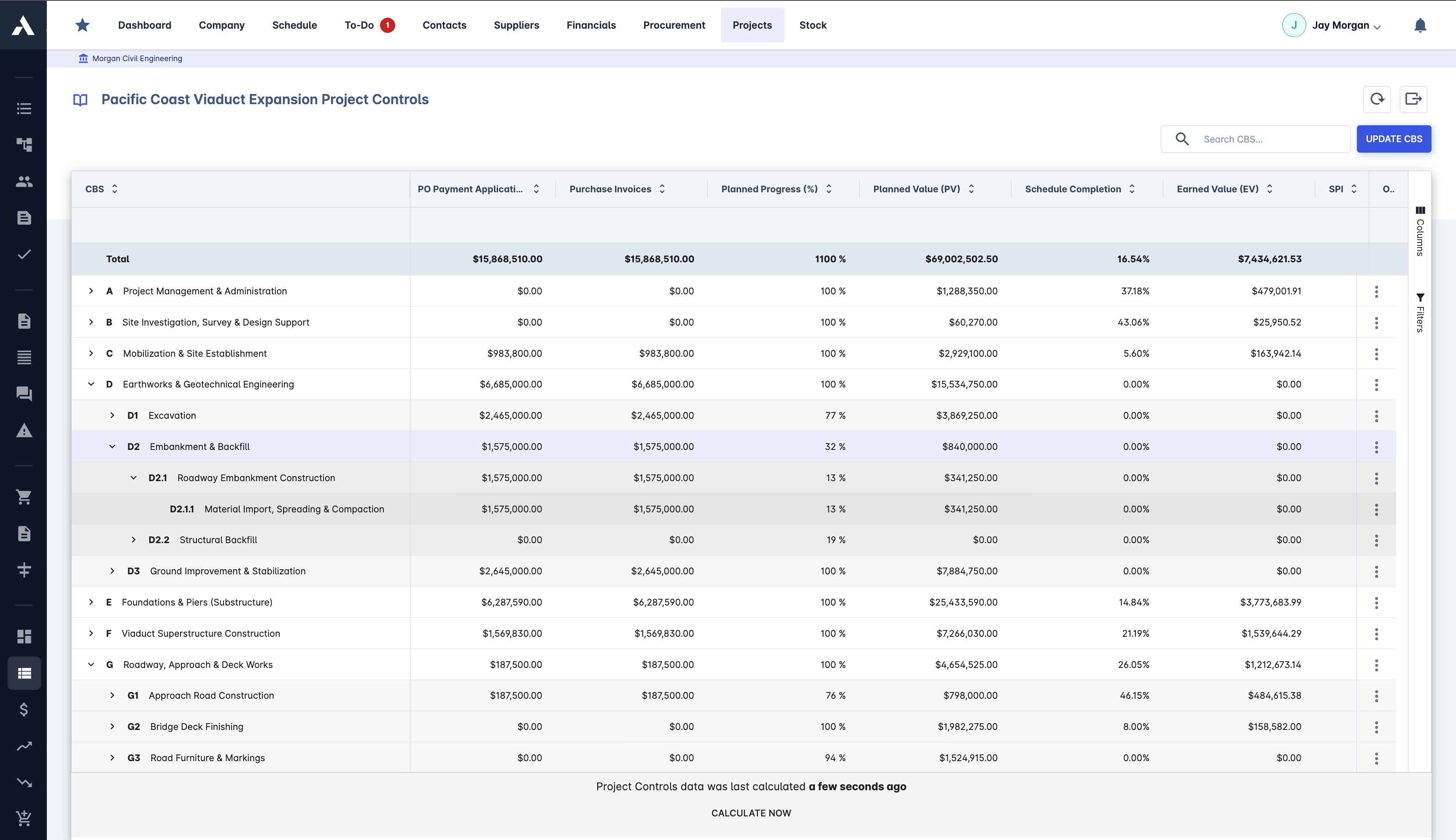
True Cost and CVR Reporting
CVR (cost value reconciliation) per job and across the portfolio, built from the same records site and commercial teams work in. Budget, committed, actual and forecast sit on one screen.
CVR (cost value reconciliation) per job
Budget, committed, actual and forecast together
Portfolio view across all live jobs
Custom KPIs from the same cost records
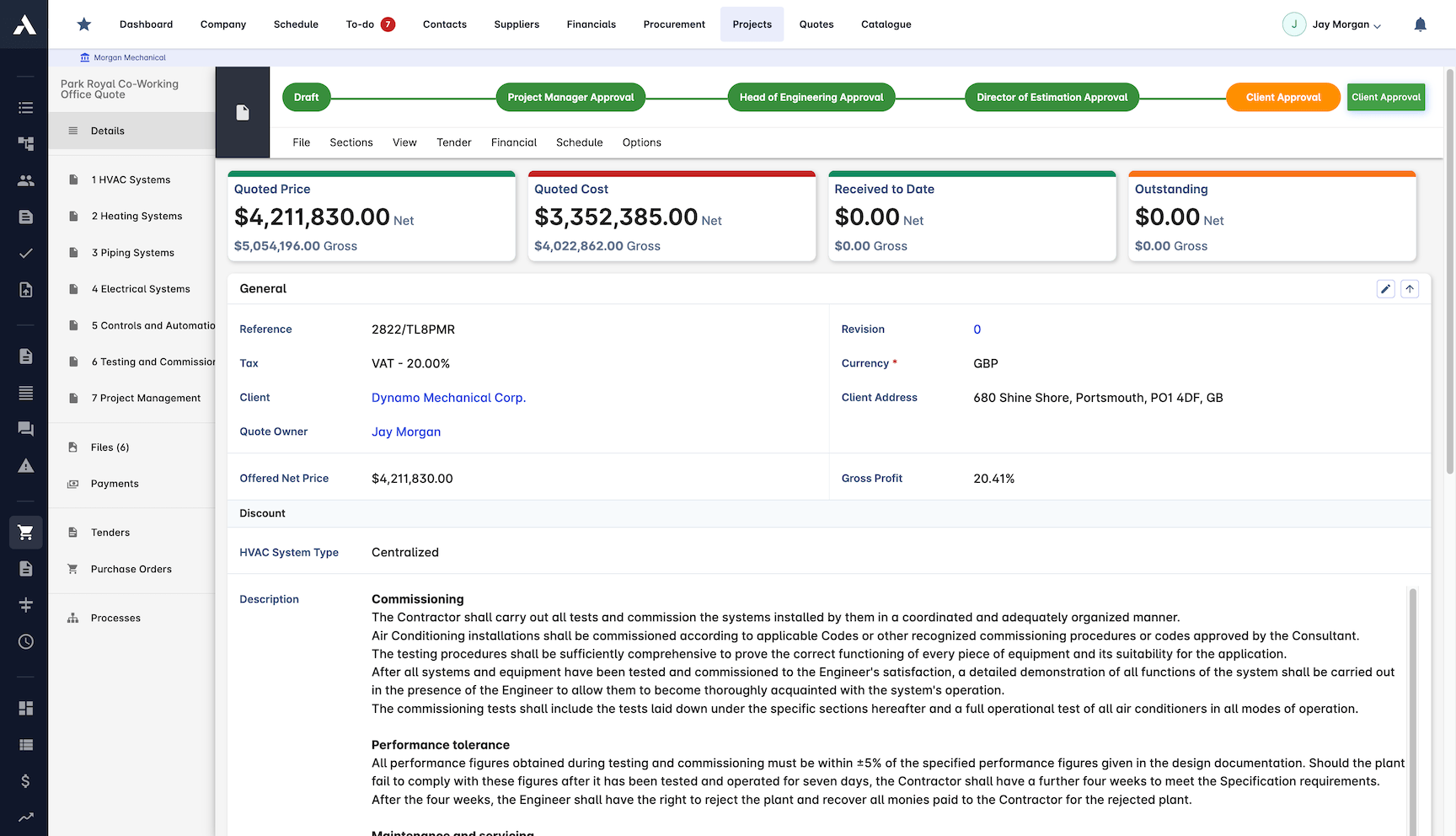
Estimate to Budget
Win the job and the priced estimate becomes the cost-coded budget, line by line. Job costing starts from the numbers the work was sold on, with no re-keying and no translation loss between sales and delivery.
Winning estimate becomes the working budget
Cost codes carried from pricing to delivery
No re-keying between estimating and delivery
Margin visible per line from day one
Committed Cost Visibility
Purchase orders and subcontract packages post to the job as commitments the moment they are raised. The gap between committed and invoiced stays visible, so nothing arrives at the final account unannounced.
POs and subcontracts land on the budget when raised
Committed versus invoiced per cost code
Amendments tracked against the original order
Cost visible months before the invoice
Frequently Asked Questions: Construction Job Costing
What is job costing in construction?
Job costing tracks what each job actually costs by coding labour, materials, plant and subcontractor spend to the job and cost code that caused it, as the cost is incurred. Compared against the budget the winning estimate created, it shows the true position per job while the work is still running, not after the final account.
How does Archdesk track job costs?
The winning estimate becomes the cost-coded job budget, and from that point every timesheet, purchase order, subcontract and invoice lands on its cost code. Committed cost posts when an order is raised, actuals post when invoices are matched, and CVR (cost value reconciliation) shows budget, committed, actual and forecast together per job and across the portfolio.
How is labour cost captured per job?
Site timesheets carry cost rates, so recorded hours become labour cost on the right job and cost code the day they are worked rather than when payroll closes the month. Expenses and plant time are recorded with the same work.
What is the difference between committed and actual cost?
Committed cost is money you have promised: purchase orders and subcontract packages post to the job the moment they are raised. Actual cost is money invoiced against those commitments. Archdesk keeps both visible per cost code, so a job’s true position is known months before the invoices arrive.
Can job costing feed the next estimate?
Yes. Every job closes with a complete actual-cost record per cost code, so estimators price the next bid from what jobs really cost. Because the estimate, the budget and the actuals share the same cost codes, the comparison needs no re-keying.
How do payment notices and retention fit into the payment side of job costing?
In UK practice, paying a subcontractor runs on the application and certification cycle: a payment notice sets out what will be paid, a pay less notice any difference, and retention is held and released under the subcontract. Documents, approvals and payment records live on the same job record in Archdesk, so the paper trail sits with the job cost numbers.
How does Archdesk handle retention on job costs?
Retention is tracked per subcontract alongside the job cost record, so balances and release timing stay visible next to the costs they belong to. When the defects period ends, the release is a line already in the numbers rather than a figure someone has to hunt down.
Do applications for payment run in Archdesk?
Yes. Applications for payment run in the platform against the same cost codes the job budget and the CVR read from, so the applied position and the actual cost position sit on one record per job.
Does Archdesk integrate with UK accounting systems?
Yes. Archdesk is a certified Xero partner and integrates with Sage, so job cost records and the ledger stay in step without re-keying and finance keeps its own system.
Does the CVR come from the job costing records?
Yes. The CVR (cost value reconciliation) is produced from the same live records job costing runs on, per job and across the portfolio, so there is nothing to rebuild in a spreadsheet at month end.
Learning the process? Read the construction job costing guide. Or browse all job costing and cost control guides.
This page is about what each job really costs against the priced numbers. Setting and managing the budget is construction budgeting, and live actual-versus-estimate control with the CVR is project cost controls. The priced numbers the job is costed against start life in construction estimating software, and committed cost lands through construction procurement.
Explore Related Solutions
Everything below runs in the same system, working from the same live data.
Estimation
Accurate project cost estimation
Tender Management
Streamline your bidding process and win more jobs
Variation Management
Handle project changes efficiently and accurately
Client Proposals
Create professional client facing proposals
BIM Integration
3D take-off estimation
Project Cost Controls
Monitor and compare your actuals with the estimate
Discover more
Explore the full range of solutions and find the right fit for your business.
See your next project on Archdesk
Book a demo and walk through a fully worked example project: one platform running everything from winning the work to closing it out.
Book a Demo

