
Archdesk for Cost Controllers
Control costs while they moveCommitments at the source, one structure across jobs, forecasts that stay honest.
A look at Archdesk from the cost controller's seat: where the numbers come from, why they arrive current, and straight answers to the questions cost professionals ask before trusting a system.
Trusted by construction companies of every size, worldwide













We know the gap you work in
Cost control in most companies means reconstructing the truth weeks after the money moved. Archdesk closes the gap between when cost is created and when you can see it. Side by side:
You stop reconstructing what happened, and start controlling what happens next.
Not just cleaner data. Cost discipline built in.
Archdesk carries the cost habits of thousands of contractors: structures and controls refined across markets and project types, working from day one.
One structure, every job
Cost breakdown structures proven across thousands of projects are configured once and reused everywhere, so every job speaks the same cost language, from estimate through closeout.

Committed means visible
Nothing spends quietly. Every order passes an approval route and lands as commitment the day it is raised.
Estimates that learn
Final costs feed back to the estimating library, so the next bid starts from what things actually cost.
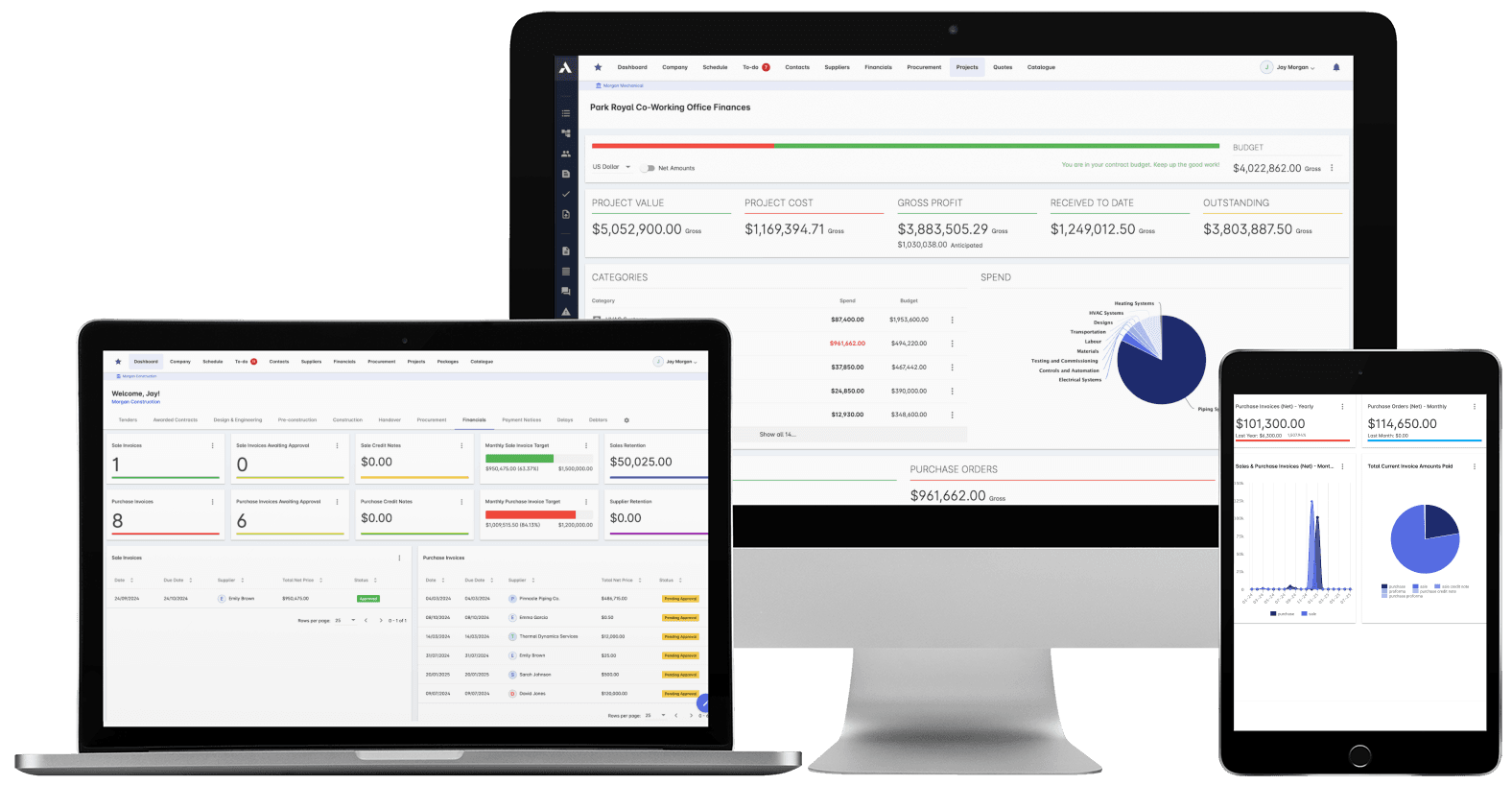
Cost control in Archdesk: budget, commitments, actuals and forecast, line by line.
Where cost controllers spend their time in Archdesk
Questions cost controllers ask us
Where does the cost data actually come from?
From the working records: purchase orders and subcontracts raised on the job, timesheets and site records from the field, invoices matched against orders, and change orders priced through approval. You read the same records the teams work from, not a submission made for you.
Can we keep our cost breakdown structure?
Yes. Budget and cost structures are configured to how you already code work, and then reused as templates so every project starts consistent. If your current structure has grown messy, onboarding is the natural moment to rationalize it.
How does forecasting work?
Forecast final cost builds per budget line from committed cost, actuals and recorded progress, giving cost to complete per line with your adjustments on top. Because the inputs update continuously, the forecast moves when reality moves, not when the monthly return lands.
Can we run CVR and earned value reporting?
Yes. The CVR (cost value reconciliation) comes straight from the live records: value, committed cost, actuals and forecast per job. Earned value metrics, including CPI and SPI, and cost and schedule variances track at project and portfolio level.
What about change orders and scope change?
Changes are priced against the budget, routed for approval and tracked from instruction through to final billing. Unapproved scope stops leaking into cost silently.
Does it reconcile with accounts?
Archdesk integrates with Xero (as a certified partner), Sage, QuickBooks and other systems, mapped to your chart of accounts. The project cost ledger and the books stay in step without manual reconciliation.
Will PMs and site teams actually keep the data current?
Yes, because the records that feed you are the records that run their work: orders have to be raised to buy, timesheets to pay, forms to close out. Cost data is a byproduct of working, which is why it stays current.
See cost control at the source
In the demo we walk you through a fully worked project in Archdesk from the cost seat: budgets, commitments, forecasts and final billing. Book a demo and see.
Book a Demo