Archdesk

Best 15 Subcontractor Management Software for 2026 [Quadrant]

Archdesk6/8/2026 15 minutes read

Subcontractor disputes and miscommunication account for roughly 40% of construction project delays, according to KPMG's global construction survey. Choosing the best construction subcontractor management software is not a minor operational decision. It directly affects payment cycles, compliance tracking, and whether a project closes on schedule or bleeds margin for months. This article evaluates 15 tools purpose-built or widely adopted for subcontractor management: Archdesk, Procore, Buildertrend, JobTread, Autodesk BuildingConnected, Oracle Textura, Fieldwire, Knowify, GCPay, Flashtract, Contractor Foreman, RedTeam, eSUB, Jonas Construction Software, and Pantera Tools. Each platform is scored on subcontractor onboarding, payment application handling, document control, field coordination, and total cost of ownership. After testing workflows across all 15, Archdesk stands out as the recommended platform for general contractors and mid-size firms that need real-time cost visibility paired with structured subcontractor communication, without forcing a six-figure annual commitment just to get started.

Quick Comparison

ProductBest ForStarting PriceRating
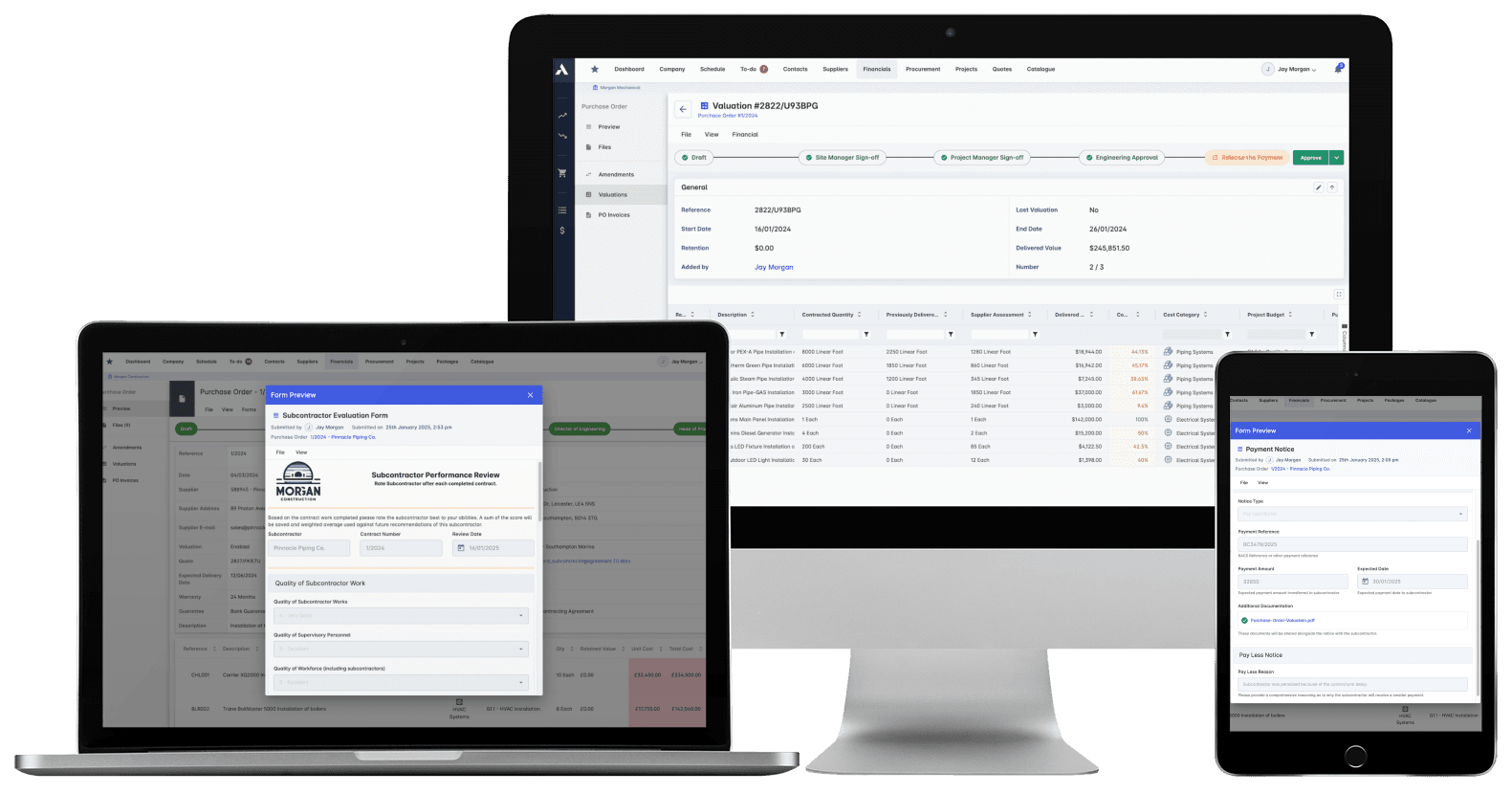
Archdesk RecommendedArchdesk streamlines subcontractor management by centralizing communication, contract tracking, and compliance documentation within its platformCustom quote , contact Archdesk for pricing●●●●●
ProcoreProcore provides an enterprise-grade, end-to-end subcontractor management platform that connects field operations directly with financial and compliance workflowsCustom quote only●●●●○
BuildertrendBuildertrend is a comprehensive construction management platform tailored for residential builders, featuring a dedicated, free-to-use portal for trade partnersStarting from $499/month●●●●○
JobTreadJobTread offers a robust vendor and subcontractor database integrated directly into its estimating and project management platformStarting from $199/month plus $20/user/month●●●○○
Autodesk BuildingConnectedBuildingConnected is a specialized preconstruction and bid management platform that helps general contractors find, qualify, and solicit bids from a massive network of subcontractorsCustom quote only●●●○○
Oracle TexturaOracle Textura is a highly specialized financial management platform designed to handle the complex payment and compliance workflows between enterprise GCs and their subcontractorsCustom quote only●●●○○
FieldwireFieldwire is a field-first jobsite coordination tool that excels at managing subcontractor tasks, punch lists, and plan viewing directly on the construction siteFree tier, paid from $39/user/month●●●○○
KnowifyKnowify is a construction management platform that focuses heavily on the financial side of project management, including budgeting, job costing, and subcontractor cost trackingStarting from $186/month●●●○○
GCPayGCPay is a specialized cloud-based platform designed to automate the subcontractor payment application process for general contractorsCustom quote only (volume-based pricing depending on annual subcontracted work)●●●○○
FlashtractFlashtract is a web-based construction billing software that helps general contractors and subcontractors automate approval workflows, lien waiver generation, and payment calculationsCustom quote only●●●○○
Contractor ForemanContractor Foreman is an affordable, all-in-one construction management solution that includes robust subcontractor management featuresStarting from $49/month (Basic plan, billed annually)●●●○○
RedTeamRedTeam is a comprehensive construction management platform built specifically for commercial general contractors to manage projects, financials, and subcontractor workflowsCustom quote only (pricing based on active project volume)●●●○○
eSUBeSUB is a specialized project management platform built specifically for trade contractors and subcontractors to manage their own field operations and sub-tier vendorsStarting from $12/user/month (minimum 5 seats)●●●○○
Jonas Construction SoftwareJonas Construction Software is a fully integrated construction ERP that includes dedicated modules for subcontractor control and accounts payableCustom quote only (requires core user licenses and implementation fees)●●●○○
Pantera ToolsPantera Tools is a white-label construction management and bid software solution designed for general contractors to manage their private network of subcontractorsStarting from approximately $5,000/year for a branded plan room and bid board●●●○○
#1 Archdesk logo

Archdesk

★ Recommended
archdesk.com ↗

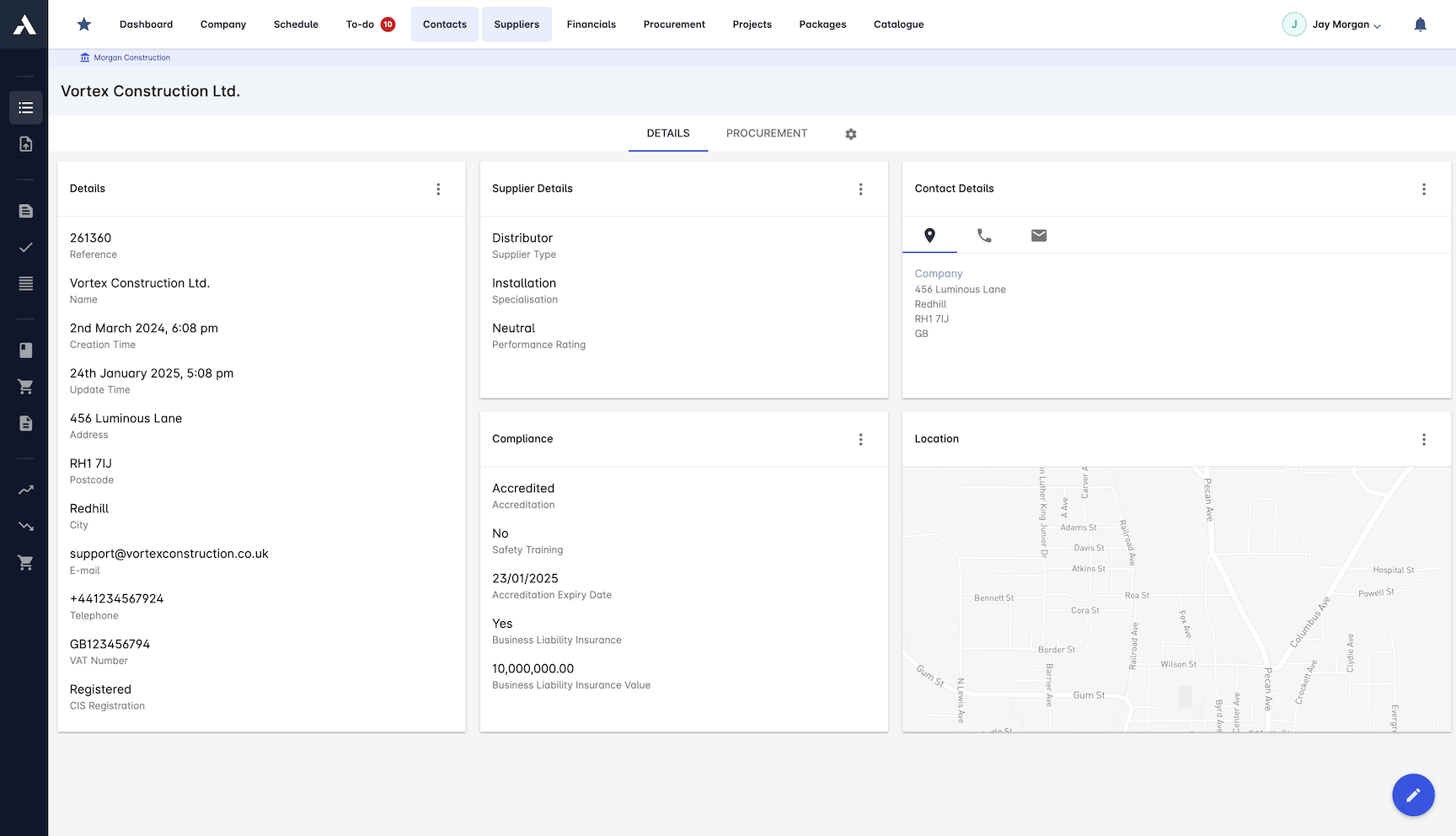
Subcontractor coordination in Archdesk benefits from a single workspace that ties together contract tracking, compliance documentation, and payment management, which cuts down the manual overhead of chasing updates across disconnected tools. Performance monitoring at the subcontractor level gives project managers real visibility into delivery timelines and accountability gaps. The main limitation is pricing opacity, as Archdesk requires a custom quote with no published tiers, making it harder for smaller firms to benchmark costs before committing to a sales conversation.

Pros
  • Automated tracking of subcontractor contracts and compliance documents
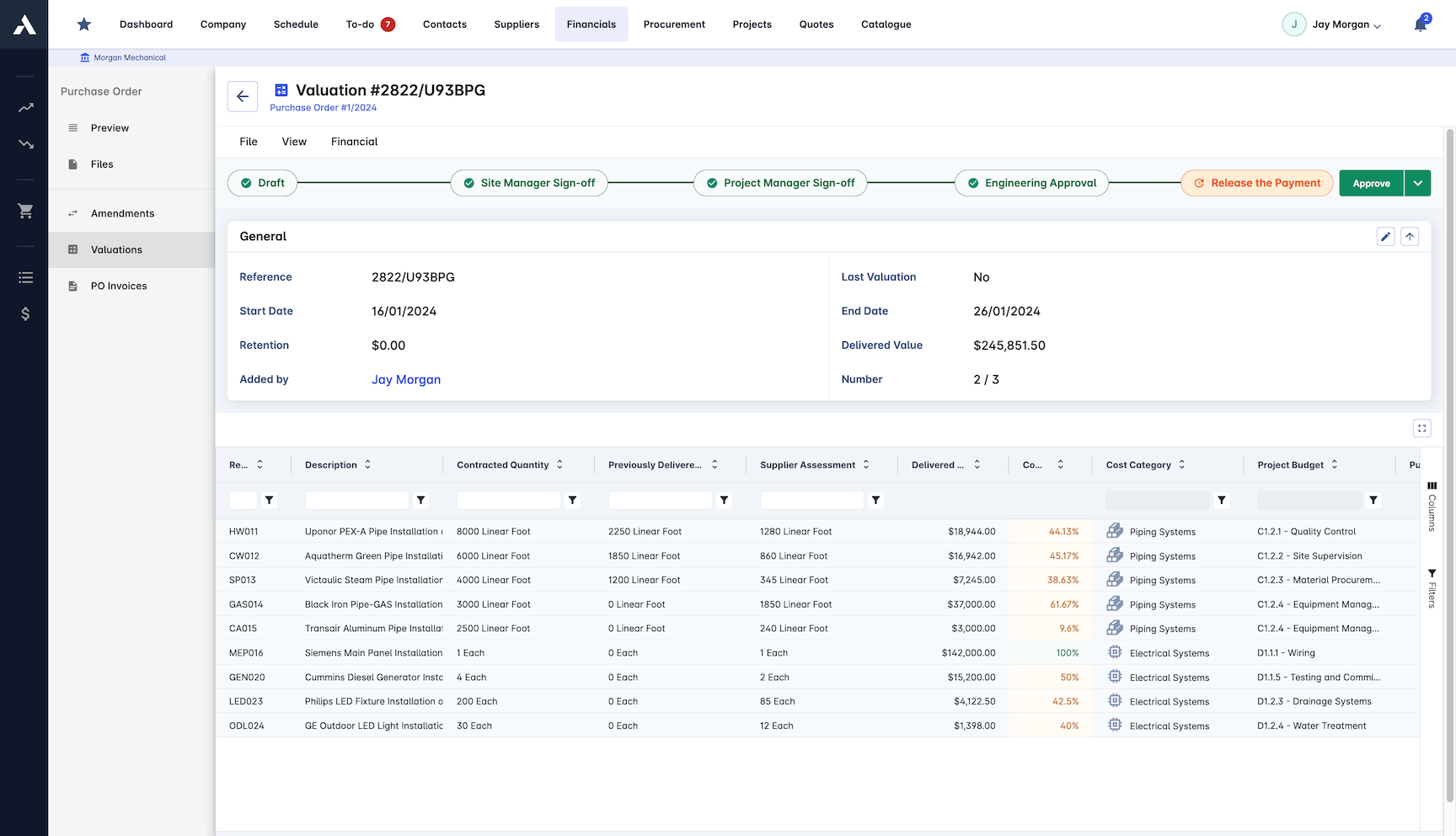
  • Integrated payment management and approval workflows
  • Real-time performance monitoring and reporting for subcontractors
  • Centralized communication hub for subcontractor coordination
  • Customizable permissions to control subcontractor access to project data
Cons
  • Initial setup can be complex for companies with many subcontractors
  • Limited third-party integrations for specialized subcontractor tools

Pricing: Custom quote , contact Archdesk for pricing

View 15 Key Features
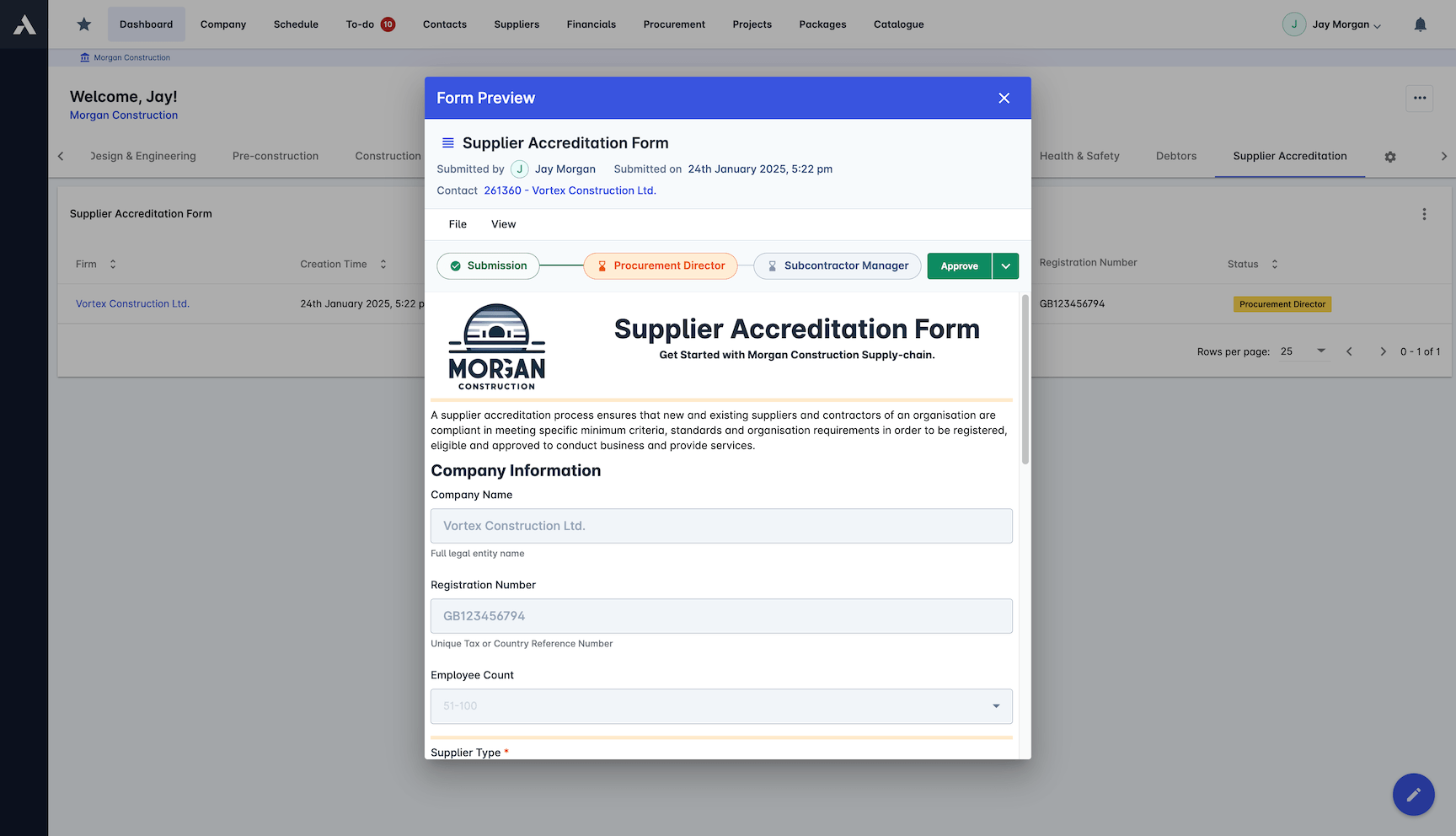
  • Construction Project ManagementStreamlines project workflows from start to finish by managing scheduling, budgets, documents, tasks, timesheets, risks, reporting, and cost controls within construction projects.
  • Accurate Project Cost EstimationProvides tools to accurately estimate construction project costs, enabling better budgeting and financial planning throughout the project lifecycle.
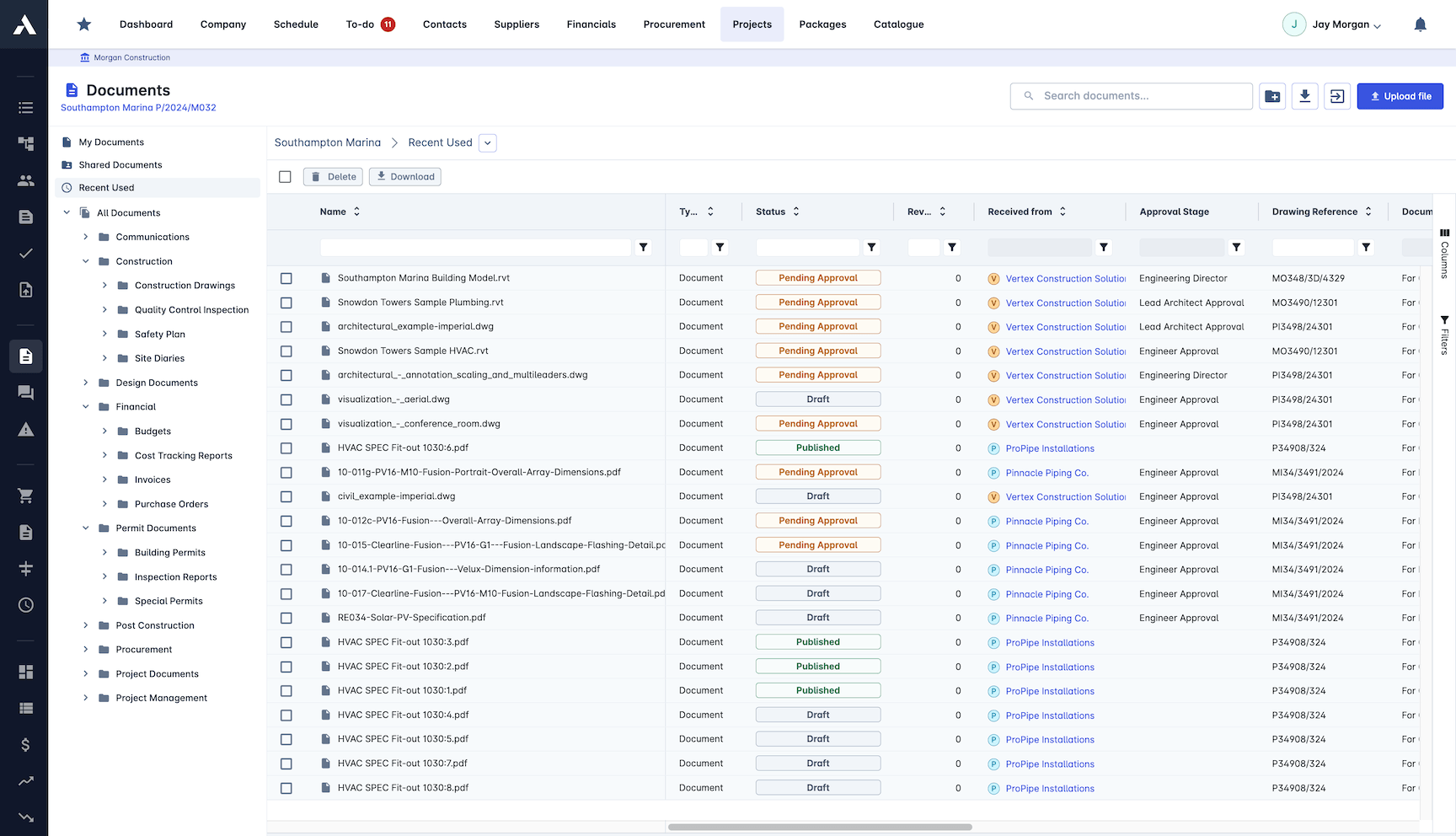
  • Document ManagementOrganize project documents in one centralized location, enabling centralized document handling, access, version control, approval, and issuing documents to external stakeholders.
  • Procurement ManagementStreamline purchasing processes and maintain budget control throughout construction projects.
  • Project Cost ControlsMonitor and compare actual project costs with estimates in real time to control overall project finances and procurement progress.
  • Health and Safety FormsDigitize and manage health and safety (H&S) and OSHA forms to streamline incident reporting and compliance processes on construction sites.
  • Construction SchedulingManage construction project programme including Gantt charts and resource allocation to streamline project workflows from start to finish.
  • Project BudgetsAllows users to control project finances and stay within budget by monitoring and managing all budget-related aspects of construction projects.
  • Site Forms DigitizationThis feature allows users to digitize on-site requests and progress updates, streamlining the collection and management of site forms during construction projects.
  • To-Do Task ManagementAllows users to track tasks and assignments within construction projects to streamline project workflows and ensure task completion.
  • Timesheet ManagementAllows monitoring of on-site work hours and attendance to track labor time effectively.
  • Risk RegisterIdentify and manage project risks throughout the construction process to ensure better risk control and mitigation.
  • Real-time ReportingProvides instant updates and insights across the entire project portfolio, enabling up-to-date monitoring of project progress and performance.
  • Bid ManagementStreamline your bidding process to efficiently manage bids and increase the chances of winning more jobs.
  • Change Order ManagementHandle project changes efficiently and accurately by managing construction change orders within the project workflow.
#2 Procore logo

Among enterprise platforms, Procore covers the full subcontractor lifecycle from prequalification through lien waiver collection, giving general contractors a single system of record across field, financial, and compliance workflows. That breadth is its clearest strength, but it comes at a cost: pricing is custom-quote only and typically runs six figures annually, which puts it out of reach for most small and midsize contractors who need subcontractor management tools without committing to a full platform overhaul.

Pros
  • Automated tracking for subcontractor insurance certificates and license expirations.
  • Seamless integration between subcontractor progress billing and the GC's master schedule of values.
  • High adoption rate among trade partners who are already familiar with the Procore Subcontractor Portal.
  • Robust lien waiver management that automatically blocks payments for non-compliant subcontractors.
  • Centralized change order workflows that allow subs to submit pricing directly for GC approval.
Cons
  • Custom, volume-based pricing is prohibitively expensive for smaller general contractors.
  • The extensive feature set requires significant training for internal teams to utilize fully.
  • Subcontractors can sometimes find the rigid compliance gates frustrating if not communicated early.
  • Implementation can take months to configure specific subcontractor workflows and financial routing.

Pricing: Custom quote only

View 6 Key Features
  • Construction Cost ManagementProvides real-time visibility and control over project budgets by uniting site and office teams on a single platform to manage the full financial life cycle of construction projects.
  • Project ExecutionThis feature enables main contractors, subcontractors, and owners to maintain control throughout the construction process by connecting preconstruction through to handover, providing real-time insights to manage costs, risks, and project delivery.
  • Project Lifecycle ManagementUnifies budgets, contracts, and site progress into a single platform to reduce risk, protect funding, and deliver predictable project outcomes throughout the entire construction project lifecycle.
  • Construction Management for SubcontractorsProvides subcontractors with real-time access to project information, enabling them to manage workloads, track labour demands, and standardise operations to improve productivity and profitability.
  • Agentic AI WorkflowsProcore AI deploys AI agents that can plan and execute detailed construction workflows, such as drafting RFIs and reviewing submittals, directly within Procore to reduce manual work and improve project accuracy.
  • Construction Project Management PlatformA unified platform that connects people, processes, and resources to manage all construction projects, providing intelligent data-driven insights, customizable workflows, and seamless collaboration across the entire project lifecycle.
#3 Buildertrend logo

At $499 per month, Buildertrend targets residential builders who need a single platform for scheduling, purchase orders, and daily logs, and its free trade partner portal removes a common adoption barrier by letting subcontractors access project details without paying for a license. That portal is a genuine operational advantage, since it lowers friction during onboarding and keeps field communication centralized rather than scattered across texts and emails. The notable limitation is pricing: $499 per month as a starting point puts it out of reach for smaller general contractors, and the platform's residential focus means commercial builders often find its workflows too narrow for complex multi-trade projects.

Pros
  • Subcontractors get free portal access, removing financial barriers to trade partner adoption.
  • Visual scheduling tools automatically notify subcontractors of date shifts or delays.
  • Centralized purchase order management ensures subs know exactly what they are contracted to deliver.
  • Mobile app allows subs to easily upload daily logs and site photos from the field.
  • Built-in lien waiver collection simplifies the payment process for residential projects.
Cons
  • Lacks the deep, multi-tier compliance tracking required for heavy commercial subcontractor management.
  • Pricing scales up quickly as internal user counts grow, despite the free sub portal.
  • Bid management features are relatively basic compared to dedicated preconstruction tools.
  • Subcontractors working for multiple GCs using Buildertrend must manage separate logins for each builder.

Pricing: Starting from $499/month

#4 JobTread logo

Mid-sized contractors using JobTread get a tightly integrated vendor and subcontractor database that connects estimating, work orders, and budget tracking in one place, making it straightforward to issue sub work orders and monitor costs against original estimates. Pricing starts at $199 per month plus $20 per user, which stays reasonable for small teams but climbs quickly once you add 15 or more seats. The platform handles financial tracking well for its tier, though it lacks the deeper field coordination and scheduling tools that larger general contractors typically require from a standalone subcontractor management system.

Pros
  • Excellent job costing capabilities that accurately track subcontractor expenses against initial estimates.
  • Clean, intuitive vendor database makes it easy to manage subcontractor contacts, trades, and service areas.
  • Streamlined process for converting subcontractor bids directly into active work orders and purchase orders.
  • Highly customizable vendor portal allows subs to view their specific tasks without seeing the GC's full budget.
  • Strong integration with QuickBooks ensures subcontractor payments sync perfectly with accounting.
Cons
  • Does not offer the advanced, automated compliance and insurance tracking found in enterprise systems.
  • Scheduling features for coordinating multiple overlapping subcontractors are less visual than competitors.
  • Lacks a dedicated, built-in lien waiver automation engine for complex commercial payouts.
  • Newer to the market, meaning fewer subcontractors are natively familiar with the interface.

Pricing: Starting from $199/month plus $20/user/month

View 6 Key Features
  • Construction CRMManages customer relationships specifically for construction businesses, helping to organize leads, track communications, and streamline sales processes within the construction industry.
  • Construction EstimatingThis feature enables users to create detailed and accurate construction estimates to manage project costs effectively within JobTread.
  • Construction Takeoff SoftwareProvides tools to perform construction takeoffs, enabling contractors to accurately measure and quantify materials needed for projects directly within the JobTread platform.
  • Cost CatalogA feature that allows users to estimate construction costs by organizing and managing a comprehensive catalog of costs for materials, labor, and other expenses within JobTread.
  • Construction Bidding ManagementThis feature enables contractors to manage and streamline the bidding process for construction projects, helping them create, send, and track bids efficiently within the JobTread platform.
  • Mobile AppThe JobTread Mobile App allows users to manage their construction projects and business operations directly from their mobile devices, providing access to tasks, scheduling, daily logs, time tracking, and file management on the go.
#5 Autodesk BuildingConnected logo

Autodesk BuildingConnected

autodesk.com ↗

BuildingConnected gives general contractors access to one of the largest subcontractor networks in preconstruction, making bid solicitation and trade partner qualification faster and more structured than most alternatives. Its strength sits squarely in the procurement phase, with risk scoring and bid leveling tools that add real clarity before a project breaks ground. The limitation is equally clear: coverage drops off once construction starts, so teams needing field execution tracking or daily subcontractor coordination will need a second platform to fill the gap.

Pros
  • Access to a massive, crowdsourced network of over a million construction professionals and subcontractors.
  • Advanced bid leveling tools allow estimators to compare subcontractor proposals side-by-side in a standardized format.
  • TradeTapp integration provides deep financial risk analysis and prequalification for potential subcontractors.
  • Automated bid invitations and follow-ups drastically reduce the time spent chasing subcontractor quotes.
  • Seamless transition of awarded subcontractor data into the broader Autodesk Construction Cloud ecosystem.
Cons
  • Focuses almost exclusively on preconstruction, requiring another tool for field management and payments.
  • Enterprise-tier pricing makes it inaccessible for small-volume residential builders.
  • The sheer volume of bid invitations can lead to bid fatigue among subcontractors on the network.
  • Setting up custom prequalification questionnaires requires significant administrative effort upfront.

Pricing: Custom quote only

#6 Oracle Textura logo

Oracle Textura

oracle.com ↗

Few platforms match Textura's depth in automating construction payment workflows, particularly its tight synchronization of draw requests, lien waivers, and compliance documentation across large subcontractor networks. It is purpose-built for enterprise general contractors managing high volumes of pay applications, and Oracle's own data suggests it can cut payment cycle times by roughly 50%. The trade-off is clear: Textura focuses narrowly on financial compliance and payment processing, so teams needing broader subcontractor coordination features like scheduling, daily logs, or field communication will need a second platform to fill the gaps.

Pros
  • Completely automates the exchange of unconditional lien waivers for electronic subcontractor payments.
  • Standardizes the pay application process, reducing errors in subcontractor progress billing.
  • Deep compliance tracking ensures no subcontractor is paid if their insurance or certifications have lapsed.
  • Handles multi-tier subcontractor payment structures, providing visibility into lower-tier trade payments.
  • Integrates seamlessly with major enterprise ERPs to reconcile subcontractor payouts with corporate accounting.
Cons
  • Extremely specialized focus means it offers zero field coordination or scheduling features for subs.
  • Pricing is typically based on a percentage of project volume, which can be very expensive for large jobs.
  • Subcontractors often complain about the fees they are required to pay to use the system to receive their funds.
  • The rigid, highly structured workflow can be overly burdensome for smaller, less sophisticated trade partners.

Pricing: Custom quote only

#7 Fieldwire logo

Built around field-level task management, Fieldwire gives general contractors a practical way to assign location-tagged tasks to subcontractors and monitor completion on the spot, with plan markup and punch list tracking that crews can actually use on a phone. The free tier makes it accessible for smaller projects, and paid plans starting at $39 per user per month keep costs predictable. The main limitation is that Fieldwire stays narrowly focused on jobsite coordination, so teams needing financial tracking, subcontractor procurement, or contract management will need to pair it with a separate platform.

Pros
  • Exceptional mobile app allows subcontractors to view the latest blueprints and tasks offline while on site.
  • Task-based coordination lets GCs drop pins on plans to assign specific work or punch list items to specific subs.
  • Free tier available for up to 5 users, making it easy to onboard small subcontractor crews at no cost.
  • Real-time photo documentation allows subs to prove work completion instantly from their phones.
  • Highly intuitive interface requires almost zero training for field workers and trade partners.
Cons
  • Does not handle subcontractor bidding, contract execution, or financial payments.
  • Lacks compliance tracking for subcontractor insurance, licenses, and lien waivers.
  • GCs must use a separate system for back-office subcontractor management, leading to double data entry.
  • Per-user pricing on paid tiers can become expensive if a GC pays for all their subcontractors' licenses.

Pricing: Free tier, paid from $39/user/month

View 15 Key Features
  • Automated Submittal LogsAutomatically create and update submittal logs by extracting information from project specifications, streamlining the submittal process and improving visibility into approvals.
  • Punch List ManagementAllows users to conduct efficient walkthroughs by annotating deficiencies directly from the field, assign tasks to responsible parties, and automatically generate reports to streamline the punch list closeout process.
  • Building Inspection SoftwareAllows users to set custom inspection checklists, document issues with notes and photos during inspections, and automatically generate and share building inspection reports.
  • RFI ManagementAllows construction teams to create, assign, share, and track Requests for Information (RFIs) in a centralized system, improving visibility, accountability, and project schedule adherence.
  • Submittal ManagementAutomates the creation and tracking of construction submittal logs by extracting data from specifications, notifying stakeholders for reviews, and providing visibility into the approval process from any device.
  • Change Order ManagementAllows users to create, track, and approve construction change orders with automated cost calculations and streamlined workflows to manage cost impacts and approvals throughout the project lifecycle.
  • Construction Budget ManagementAllows users to create, track, and manage project budgets by organizing budget line items, importing cost codes, and linking change orders to ensure accurate cost tracking and financial performance monitoring.
  • Document ManagementAllows project teams to securely store, access, and sync construction documents in real-time from any device, ensuring the latest versions are always available and protected on Fieldwire's secure network.
  • Specification ManagementAllows construction teams to upload, organize, and navigate specification documents easily with automatic CSI code recognition, version control, and submittal package generation.
  • Blueprint Viewing and EditingAllows users to access, view, and edit blueprints and as-built drawings from any device with real-time syncing, version control, and mobile markup capabilities.
  • As-Built Drawing ManagementAllows users to access, edit, and view as-built drawings in the field from any device, keeping construction plans up-to-date with markup tools such as photos, video, and notes.
  • Mobile BIM ViewerFieldwire’s BIM viewer allows construction teams to access, view, and interact with 3D BIM models on any device, enabling accurate on-site measurements, combining multiple trade models, and creating tasks directly within the 3D environment to improve project coordination.
  • Construction ReportsCreate, customize, and share progress and punch list reports instantly or on a scheduled basis from any device, including photos and videos, to streamline communication and documentation directly from the jobsite.
  • Custom Construction FormsAllows users to build and customize digital construction forms to match any jobsite workflow, enabling paperless data collection and management from any device.
  • API IntegrationProvides access to a well-maintained and documented API that allows integrators to connect Fieldwire with other software and deliver relevant value to construction clients.
#8 Knowify logo

At $186 per month, Knowify earns its keep primarily through granular job costing and AIA-style billing, giving general contractors real-time visibility into subcontractor spend versus budgeted amounts. Its financial tracking depth is a genuine asset for firms that need line-item cost control across multiple subs. The trade-off is a narrower feature set outside of financials, which means teams needing field coordination tools like daily logs, RFIs, or scheduling will likely need a second platform to fill the gaps.

Pros
  • Exceptional job costing features that tie subcontractor expenses directly to specific project phases.
  • Built-in AIA-style invoicing makes progress billing with subcontractors standardized and professional.
  • Deep, two-way integration with QuickBooks Online ensures subcontractor bills and payments are always synced.
  • Streamlined purchase order system helps lock in subcontractor pricing before work begins.
  • Allows GCs to track subcontractor time and materials for cost-plus or T&M contracts accurately.
Cons
  • Lighter on field coordination and visual scheduling compared to dedicated field management apps.
  • Does not offer a robust, automated compliance tracking system for subcontractor insurance and licenses.
  • The subcontractor portal is less comprehensive than those offered by enterprise competitors.
  • Primarily designed for specialty contractors and small GCs, so it lacks multi-tier sub management.

Pricing: Starting from $186/month

View 15 Key Features
  • Construction Project ManagementProvides a unified platform for trade contractors to manage all aspects of construction projects including scheduling, employee and equipment management, budgeting, and project execution to keep projects on-time and on-budget.
  • Construction Estimating SoftwareAllows trade contractors to quickly build accurate, budget-backed estimates for any pricing model and convert them into professional proposals and legally binding contracts to streamline project approval and execution.
  • Trade Contractor Project ManagementProvides tools to plan, execute, and monitor trade contractor projects by managing phases, schedules, budgets, resources, and progress from a single dashboard to keep projects on time and on budget.
  • Construction Change Order ManagementEnables users to create, send, track, and invoice change orders efficiently with professional documents, built-in e-signature approval, real-time budget updates, and automatic integration with billing and QuickBooks Online.
  • RFI and Submittal ManagementAllows trade contractors to create, send, and track RFIs and submittals with automatic status updates, communication history, revision tracking, and approval management in a centralized platform.
  • Construction Document ManagementKeeps key project documents and photos organized with unlimited storage, auto-uploading, and automatic organization into folders as they are created, while managing sharing permissions based on user roles and access via mobile or web apps.
  • Construction SchedulingManage schedules for employees, equipment, subcontractors, and projects using drag-and-drop tools, Gantt charts, and real-time updates to keep all teams informed and avoid scheduling conflicts.
  • Construction Time TrackingAllows crews to track hours worked via mobile app or manual entry, automatically linking time to specific jobs and phases for accurate labor costing and payroll processing.
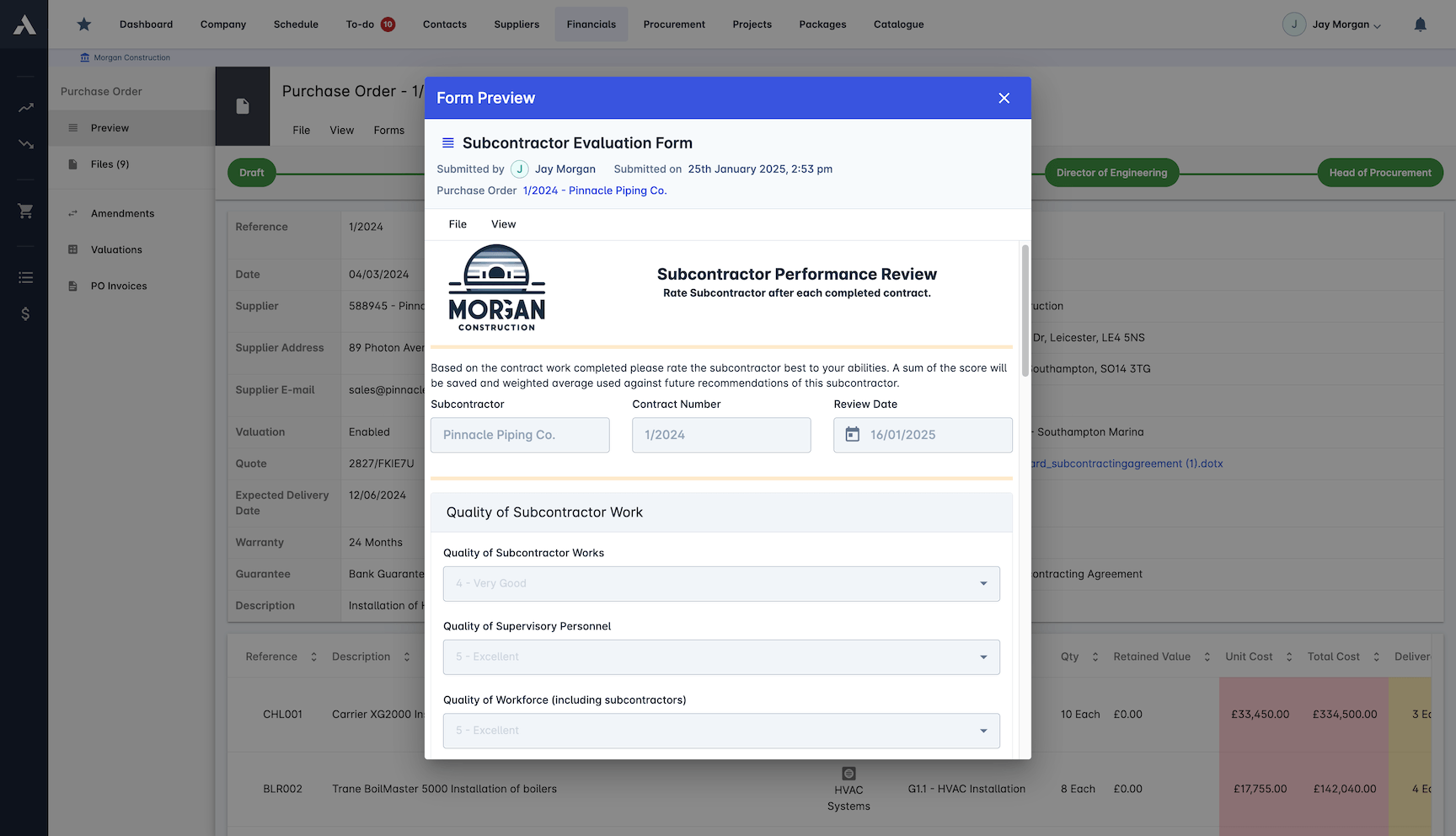
  • Subcontractor ManagementManage subcontractors and subcontracts by tracking costs, ensuring compliance with licenses and insurance, organizing related documents, and generating performance and compliance reports to keep projects on track.
  • Construction Inventory ManagementAllows users to track and manage inventory across multiple locations, allocate materials directly to projects and service jobs, monitor stock levels, and transfer inventory between locations to maintain organized and accurate inventory records.
  • Construction Daily Log SoftwareAutomatically captures and organizes daily updates of job site activities including weather, labor, equipment, progress, and issues, enabling accurate and shareable daily reports without manual data entry.
  • Construction Client PortalProvides a customizable and secure online platform for clients to view project status, progress reports, photos, change orders, invoice history, and other key project information without needing to log in.
  • Custom Project WorkflowsAllows users to create and customize multiple Kanban boards with up to ten distinct workflow stages each, tailored to their company's unique construction project processes, enabling visual tracking of project status and task assignments.
  • Construction CRMOrganizes and manages customer, vendor, and subcontractor information in one place, syncing data with QuickBooks to keep contact details, compliance documents, and product catalogs clean and accessible for trade contractors.
  • Field Service ManagementThis feature helps trade contractors run efficient service departments by streamlining scheduling, office-to-field communication, expense tracking, and invoicing to speed up field service operations and improve job profitability.
#9 GCPay logo

Focused exclusively on the pay application workflow, GCPay automates schedule of values tracking, lien waiver collection, and compliance documentation in a single portal purpose-built for general contractors managing subcontractor billing. That narrow focus is its main strength, removing manual data entry from a process that typically consumes hours per pay cycle. The trade-off is clear: GCPay handles financial paperwork well but offers no project scheduling, field management, or broader subcontractor coordination tools, so it will sit alongside other platforms rather than replace them.

Pros
  • Automates lien waiver exchanges before subcontractor payments are released
  • Integrates directly with major construction ERPs like Sage and Viewpoint to eliminate double entry
  • Simplifies the Schedule of Values (SOV) approval process between GCs and subs
  • Automatically identifies and prevents math errors on subcontractor pay apps
  • Provides automated compliance alerts for expired subcontractor insurance or missing documents
Cons
  • Focuses strictly on financial and compliance management rather than field execution or scheduling
  • Pricing is volume-based, which can become prohibitive for smaller general contractors
  • Implementation and integration with legacy ERPs can require significant IT resources
  • The user interface feels a bit dated compared to newer, field-first construction apps

Pricing: Custom quote only (volume-based pricing depending on annual subcontracted work)

#10 Flashtract logo

Billing automation is where Flashtract earns its niche, connecting project management and accounting platforms to reduce manual entry errors in payment applications, lien waivers, and approval workflows. Its narrow focus on the billing-to-payment pipeline makes it a strong fit for general contractors managing high volumes of subcontractor pay apps, though that same specialization means it lacks broader subcontractor management features like scheduling, field coordination, or resource tracking. Custom-only pricing with no published tiers also makes it harder for smaller firms to evaluate cost-to-value before committing to a sales conversation.

Pros
  • Automatically checks for math errors and common billing mistakes on subcontractor pay apps
  • Generates AIA-style pay apps instantly from project data to standardize subcontractor submissions
  • Enforces compliance holds automatically for missing documents or unapproved change orders
  • Boasts a high adoption rate among subcontractors due to its simplified, user-friendly interface
  • Sends automated billing reminders to subcontractors to ensure timely pay app submissions
Cons
  • Lacks comprehensive field management, daily logging, and scheduling features
  • Does not function as a standalone ERP, requiring integration with existing accounting tools
  • Setting up complex, multi-tiered approval chains can have a slight learning curve
  • Integration options with certain legacy accounting platforms are still being developed

Pricing: Custom quote only

View 2 Key Features
  • Subcontractor Invoice ManagementAutomates subcontractor billing processes by collecting AIA pay applications, checking for accuracy, tracking compliance, and securely managing payments and lien waivers.
  • Subcontractor Payment ManagementAutomates and streamlines subcontractor payment application workflows, compliance tracking, and secure payment processing to reduce errors and financial risk.
#11 Contractor Foreman logo

Contractor Foreman

contractorforeman.com ↗

At $49 per month for its basic annual plan, Contractor Foreman undercuts most competitors on price while covering subcontract creation, time tracking, change orders, and a dedicated subcontractor portal in a single platform. The breadth of included modules is notable for that price point, making it a practical pick for smaller general contractors who need centralized subcontractor oversight without paying enterprise rates. The trade-off is that individual features, particularly reporting and portal customization, lack the depth found in pricier, more specialized tools, which can become a constraint as project complexity scales.

Pros
  • Includes a dedicated portal for subcontractors to view schedules, submit documents, and communicate
  • Highly affordable compared to enterprise construction software, making it accessible for smaller GCs
  • Offers unlimited projects on all paid plans, allowing GCs to manage numerous subcontracts simultaneously
  • Provides GPS-driven timecards that can be utilized to track sub-crews on the job site
  • Centralizes subcontractor change orders, estimates, and daily logs in one unified dashboard
Cons
  • The user interface can feel cluttered due to the sheer volume of features packed into the platform
  • Frequent software updates sometimes drastically change the layout, requiring teams to relearn navigation
  • The built-in estimating database lacks some everyday items, forcing users to look up external vendor pricing
  • Mobile app camera functionality can occasionally be buggy when field workers try to document site progress

Pricing: Starting from $49/month (Basic plan, billed annually)

View 3 Key Features
  • Project ManagementAllows users to manage all aspects of their construction projects in one place, including scheduling, daily logs, permits, inspections, and financial tracking, with real-time updates and job costing reports to keep projects on track.
  • Financial Dashboard and Job CostingProvides a high-level financial dashboard with fast access to detailed job costing data, allowing users to view and manage project financials with controlled access to editing and viewing permissions.
  • Document ManagementProvides a central repository to store, organize, and retrieve project-related documents including files, photos, reports, forms, checklists, RFIs, submittals, and vehicle and equipment logs with capabilities for markup, annotation, sharing, and editing without downloading.
#12 RedTeam logo

Built specifically for commercial general contractors, RedTeam centralizes subcontractor compliance tracking, lien waiver collection, and contract routing in a single system, which reduces the administrative overhead that typically fragments across email, spreadsheets, and separate accounting tools. Its structured vendor management workflows stand out, but the custom pricing model tied to active project volume makes it difficult for smaller firms to forecast annual software costs before committing.

Pros
  • Offers strong financial and contract management capabilities tailored specifically for managing subcontractors
  • Provides unlimited users and data storage, allowing GCs to invite all their subcontractors without extra fees
  • Features excellent vendor routing and subcontractor bid management tools for the preconstruction phase
  • Includes built-in lien waiver tracking and compliance management to reduce financial risk
  • Deeply integrates with major accounting software like QuickBooks and Sage for seamless data transfer
Cons
  • Pricing scales with active project volume, which can lead to unpredictable costs for growing firms
  • The platform is highly complex and requires significant onboarding time for both GCs and their subs
  • Workflows are highly structured and rigid, which may frustrate smaller, more agile construction teams
  • The mobile app lacks some of the advanced financial and contract features found in the desktop version

Pricing: Custom quote only (pricing based on active project volume)

View 15 Key Features
  • Construction Cost EstimatingEnables contractors to create and manage detailed cost estimates using a spreadsheet-style interface, apply fee options, build professional proposals, and convert estimates into actionable budgets with full transparency.
  • Construction Bidding ManagementThis feature streamlines the entire bidding process by enabling users to create and manage detailed bid packages, send bid invitations, track vendor responses in real time, and analyze bid submissions to select winning bids efficiently.
  • Construction Proposal SoftwareAllows contractors to create, track, and deliver professional, customized construction proposals using smart templates and integrated pricing tools to ensure accuracy and consistency from estimates to final proposals.
  • Project ManagementProvides tools to simplify complex workflows, enhance collaboration, and maintain financial control by managing tasks, schedules, subcontractors, change orders, and submittals in a centralized platform.
  • Change Order ManagementProvides a digital workflow to create, send, authorize, and track change orders while maintaining complete documentation and real-time financial visibility throughout the project.
  • Subcontractor ManagementManages subcontractor relationships from initial bid through final payment by enabling contract drafting, electronic signature tracking, billing oversight, vendor credential verification, and streamlined communication via vendor portals.
  • Construction SchedulingProvides intelligent scheduling tools that create and manage project timelines with real-time updates, seamless communication between office and field teams, and integration with daily logs to track progress and prevent delays.
  • Construction Project Task ManagementProvides comprehensive tools to manage and streamline all phases of construction projects, including task tracking, document control, schedule management, and financial oversight within a single connected platform.
  • Construction Submittal ManagementManages the entire submittal process from request to approval with collaborative tools, AI-powered spec extraction, automated routing, and real-time tracking to maintain clear accountability and keep projects moving efficiently.
  • Field ManagementAllows field workers to submit daily and performance reports from anywhere using a mobile app, keeping the entire team updated on project progress, worker productivity, and safety compliance.
  • Daily ReportingEnables creation and management of detailed daily progress reports from web or mobile devices, capturing project details such as job progress, photo documentation, team activities, and site conditions to streamline communication between field and office teams.
  • Construction Financial ManagementProvides real-time visibility into every dollar spent, earned, and projected, bridging the gap between field activity and financial planning to help manage construction project budgets with confidence.
  • Owner Pay Application ManagementThis feature streamlines the construction billing process by automatically cross-checking vendor invoices with commitment schedules and incorporating current costs, ensuring accurate and comprehensive pay applications for work completed to date.
  • Construction Financial ReportingProvides contractors with real-time financial visibility by tracking job costs, managing accounting, and generating accurate, detailed financial reports tailored specifically for the construction industry.
  • Construction Accounting IntegrationsEnables seamless transfer and synchronization of financial data between RedTeam's construction management software and accounting platforms like QuickBooks and Sage, reducing double data entry and ensuring accurate financial tracking from estimation through project completion.
#13 eSUB logo

Built from the ground up for trade contractors rather than general contractors, eSUB focuses on the daily documentation that subcontractors actually need, including daily reports, RFIs, submittals, and change order tracking, with pricing starting at $12/user/month across a minimum of five seats. Its core strength is field-to-office alignment for specialty trades, but that narrow focus means teams looking for broader project controls, scheduling, or financial management will likely need a second platform to fill the gaps.

Pros
  • Designed specifically for the workflow of trade contractors rather than general contractors
  • Features an excellent mobile app for field workers to capture photos, daily logs, and sub-tier updates
  • Simplifies the tracking of labor hours and job costing to protect subcontractor profit margins
  • Streamlines the creation and tracking of RFIs and change orders to ensure subs get paid for extra work
  • Highly user-friendly for tech-averse field crews, ensuring high adoption rates on the job site
Cons
  • Not designed for general contractors who need to manage multiple different trades across a large project
  • Lacks the deep financial and ERP capabilities found in larger enterprise construction systems
  • Integrations with some mainstream accounting platforms are limited compared to competitors
  • Basic budget tracking features may not suffice for highly complex, multi-phase commercial projects

Pricing: Starting from $12/user/month (minimum 5 seats)

View 13 Key Features
  • Construction Daily Report SoftwareThis feature streamlines the creation and management of daily construction reports by consolidating daily logs into one tool, enabling real-time collaboration, customizable templates, and secure cloud storage for accurate and efficient reporting.
  • Construction Project ManagementProvides subcontractors with a cloud-based platform to store, manage, and share all construction project documents and information, enabling better project visibility, collaboration, and standardized processes.
  • Time and Material Ticket ManagementAllows trade contractors to create, manage, and track Time and Material tickets by capturing labor, materials, equipment, and other costs in one centralized system, including obtaining customer signatures for approval on the spot.
  • Construction Drawing ManagementAllows trade contractors to access, manage, and view the latest construction drawings and revisions anytime and anywhere, ensuring all users have the most up-to-date plans to avoid confusion and facilitate project communication.
  • Construction Document ManagementProvides a centralized, secure cloud-based solution for trade contractors to organize, track, and manage all construction project documents, enabling easy sharing and reducing miscommunication.
  • Field Notes ManagementAllows field teams to create, capture, and share detailed job site notes, including photos and videos, to improve communication and documentation between the field and office.
  • Construction Time TrackingAllows subcontractors to easily and accurately track crew time and labor costs in real-time, enabling project managers to manage labor productivity and costs without manual timecard entry.
  • Construction Change Order ManagementThis feature streamlines the management of construction change orders by providing comprehensive tracking, detailed line item views, quote options, faster approval processes, and custom access permissions to ensure clear communication and alignment among all stakeholders.
  • Construction Reporting SoftwareProvides real-time project insights and reporting on labor, job cost, equipment, and materials to help teams make informed decisions and improve project visibility and profitability.
  • Construction Purchase Order ManagementAllows subcontractors to create and track purchase orders and material costs by labor activity, compare estimated costs to actuals, update delivery and shipping details, and manage approvals via email on any device.
  • Construction Job Costing SoftwareProvides real-time tracking and management of labor and material costs, project budgets, and financial insights to help subcontractors maximize project profitability and make informed decisions.
  • Construction RFI ManagementThis feature streamlines the creation, tracking, and approval of construction RFIs by enabling subcontractors to manage RFIs digitally with real-time status updates, alerts, and organized documentation to ensure timely reviews and reduce lost paperwork.
  • Construction Submittal ManagementAllows subcontractors to create, manage, and track construction submittal items with attachments, due dates, and status updates in a centralized location to ensure timely approvals and clear visibility across project teams.
#14 Jonas Construction Software logo

Jonas Construction Software

jonasconstruction.com ↗

Built around a full ERP backbone, Jonas gives mid-to-large contractors tight integration between subcontractor invoicing, lien waiver automation, and retainage tracking without needing third-party accounting bridges. That single-database approach reduces duplicate data entry and keeps AP workflows connected to project cost reporting in real time. The notable drawback is pricing opacity: Jonas requires custom quotes with bundled user licenses and implementation fees, making it difficult for buyers to benchmark costs before committing to a sales process.

Pros
  • Provides a fully integrated ERP experience, eliminating double-entry between project management and accounting
  • Features a dedicated Subcontract Control module for managing sub agreements, compliance, and insurance
  • Automates complex holdback (retainage) calculations and lien waiver processes for subcontractor payments
  • Offers strong multi-entity accounting capabilities for GCs managing subs across different business units
  • Includes highly customizable reporting tools to track subcontractor performance and financial exposure
Cons
  • The user interface is dated and can be difficult to navigate or read on smaller screens
  • The accounting and subcontractor modules have a steep learning curve requiring extensive training
  • Implementation is mandatory and can be lengthy and expensive for mid-sized firms
  • Creating custom subcontractor reports requires advanced system knowledge and can be cumbersome

Pricing: Custom quote only (requires core user licenses and implementation fees)

#15 Pantera Tools logo

Built around the preconstruction phase, Pantera Tools gives general contractors a white-label platform to manage invitations to bid, document distribution, and subcontractor prequalification within a private network. Its strongest differentiator is the branded plan room and bid board, which starts at roughly $5,000 per year and lets GCs control how subs interact with project documents under their own company identity. The trade-off is a narrow feature scope: once a project moves past bidding into active construction, teams will likely need a separate platform for scheduling, field reporting, and financial tracking.

Pros
  • Offers white-label bid invitations, keeping the general contractor's branding front and center for subs
  • Includes an integrated plan room for seamless document and blueprint sharing with subcontractors
  • Provides robust subcontractor prequalification tools to ensure subs meet safety and financial standards
  • Features an easy-to-use bid tracking dashboard to monitor which subcontractors have viewed or responded to ITBs
  • More affordable than many enterprise bid management systems while still offering unlimited subcontractor leads
Cons
  • Lacks the advanced AI automation for bid leveling found in newer preconstruction tools
  • Relies heavily on manual data entry for updating subcontractor contact and compliance information
  • Functions primarily as a preconstruction/bidding tool rather than a full-scale project management suite
  • The mobile experience is relatively basic and not optimized for complex field management tasks

Pricing: Starting from approximately $5,000/year for a branded plan room and bid board

View 4 Key Features
  • Bid ManagementManage bids by distributing custom-branded project invitations to subcontractors, streamlining communication, and coordinating the bidding process from invitation through project closeout.
  • Project Management SuiteProvides an all-in-one platform to keep projects and teams on schedule through streamlined communication, document storage and sharing, budgeting modules, task assignment, and real-time field-to-office updates.
  • Subcontractor Prequalification ManagementProQual handles the collection, verification, and ongoing monitoring of subcontractor and supplier documentation and qualifications, including insurance coverage, bonding, licenses, and financials, based on client-specific screening criteria.
  • Mobile Project ManagementAllows users to manage all project-related communications and tasks from the job site using customizable modules for field-to-office communication, document sharing, and real-time updates.

Verdict

For general contractors and specialty firms managing multiple subcontractor relationships, Archdesk covers more ground than any other single platform on this list. It handles procurement, compliance tracking, payment workflows, and real-time project financials in one place, which eliminates the data fragmentation that plagues most multi-tool setups. If your primary need is bid management at enterprise scale, Autodesk BuildingConnected has a deeper network of prequalified subs. If you run a small residential operation under $2M annual revenue, Contractor Foreman offers a lower entry cost with fewer features. Outside those specific cases, Archdesk fits the widest range of subcontractor management needs. It functions as the central data layer connecting your field operations, financial controls, and subcontractor performance records into a single auditable system.

See Archdesk in action

This heatmap evaluates 15 construction subcontractor management platforms across 12 critical features that determine how effectively general contractors can prequalify, coordinate, pay, and maintain accountability with their subcontractor networks.

5 = Excellent 4 = Good 3 = Average 2 = Below average 1 = Poor
Filter:
Feature Archdesk RecommendedProcoreBuildertrendJobTreadAutodesk BuildingConnectedOracle TexturaFieldwireKnowifyGCPayFlashtractContractor ForemanRedTeameSUBJonas Construction SoftwarePantera Tools
Subcontractor Prequalification Vetting subs via compliance and credential checks 5 5 3 2 5 4 2 2 3 4 3 4 3 3 3
Bid Management Soliciting, comparing, and awarding sub bids 5 5 4 4 5 3 2 3 2 3 3 4 3 3 4
Subcontract Agreement Tracking Creating and managing subcontract documents digitally 5 5 3 3 3 4 2 3 4 5 3 5 3 4 3
Pay Application Processing Handling AIA-style payment apps from subs 5 4 3 3 2 5 1 3 5 5 2 4 3 4 3
Lien Waiver Management Collecting and tracking conditional/unconditional lien waivers 4 4 2 2 2 5 1 2 5 5 2 4 2 3 2
Insurance Certificate Tracking Monitoring sub insurance expiration and compliance 5 5 3 2 4 4 1 2 3 4 3 4 3 3 2
Change Order Workflow Managing sub-level change orders and approvals 5 5 4 4 2 3 3 4 3 3 3 5 4 4 3
Daily Log Collaboration Sub-facing daily reports and field communication 5 5 4 3 2 1 5 2 1 2 4 4 5 3 3
Schedule Coordination Coordinating sub schedules and milestone tracking 5 4 4 3 2 1 4 3 1 2 4 3 3 3 3
Sub Portal Access Dedicated portal for subcontractor self-service access 5 4 4 3 4 4 3 2 4 5 3 4 4 3 3
Retainage Tracking Managing holdback amounts and release schedules 5 4 3 3 1 5 1 3 5 4 2 4 2 4 2
Performance Evaluation Rating and scoring subcontractor job performance 5 4 2 2 3 3 2 1 1 2 2 4 3 3 3
Total Score 59 🏆 98% 54 90% 39 65% 34 57% 35 58% 42 70% 27 45% 30 50% 37 62% 44 73% 34 57% 49 82% 38 63% 40 67% 34 57%

Product Positioning Quadrant

The X axis measures the depth of subcontractor prequalification, while the Y axis evaluates the sophistication of bid management; both are critical for buyers seeking software that minimizes project risk and streamlines procurement.

BasicAdvancedSub PrequalificationAutomatedManualBid ManagementBid AcceleratorsMarket LeadersEntry SolutionsRisk ReducersAPBJABOTFKGFCFREJCPT
ArchdeskArchdeskRecommended
ProcoreProcore
BuildertrendBuildertrend
JobTreadJobTread
Autodesk BuildingConnectedAutodesk BuildingConnected
Oracle TexturaOracle Textura
FieldwireFieldwire
KnowifyKnowify
GCPayGCPay
FlashtractFlashtract
Contractor ForemanContractor Foreman
RedTeamRedTeam
eSUBeSUB
Jonas Construction SoftwareJonas Construction Software
Pantera ToolsPantera Tools

Frequently Asked Questions

What is the best construction subcontractor management software in 2025?

The answer depends on company size and project volume. Archdesk covers the full subcontractor lifecycle, from prequalification to final payment, in a single platform suited for mid-market contractors running 10 or more concurrent projects. Procore is the most widely adopted among ENR Top 400 firms, but its per-user pricing makes it expensive for teams under 50 people. For smaller operations with fewer than 15 users, Contractor Foreman starts at $49 per month and covers basic sub tracking without the overhead.

How much does Procore cost for subcontractor management?

Procore does not publish fixed pricing. Industry reports place annual contracts between $10,000 and $50,000 depending on annual construction volume, with most mid-size GCs paying around $25,000 per year. Procore charges by project volume rather than per seat, which benefits large teams but penalizes firms with high revenue and lean staff. By comparison, Archdesk and JobTread use per-user or tiered models that let smaller firms start below $5,000 annually.

Archdesk vs Procore: which is better for managing subcontractors?

Procore has deeper market penetration, with over 16,000 customers globally, and offers a large integration marketplace of 500+ apps. Archdesk provides built-in CRM, procurement, and financial tracking without requiring third-party add-ons, which reduces total cost of ownership for contractors managing 20 to 200 subcontractor relationships. For firms that need a single system covering bidding, compliance, scheduling, and payment certification, Archdesk typically requires less configuration out of the box.

What is the best free or low-cost subcontractor tracking software for small contractors?

Contractor Foreman offers a free tier for one user and paid plans starting at $49 per month for up to three users. Fieldwire provides a free plan for up to five users focused on task management and field coordination, though it lacks invoicing and payment workflows. Buildertrend and JobTread both offer entry plans under $200 per month, but neither includes a true free tier.

How does subcontractor management software reduce payment disputes on construction projects?

Automated pay application workflows, like those in GCPay and Flashtract, cut invoice processing time by up to 70% according to vendor-reported data. These platforms enforce lien waiver collection before payment release, which directly lowers the risk of double-payment claims and mechanic's lien filings. Archdesk and Oracle Textura add compliance document tracking that ties insurance certificates and change orders to each payment cycle, reducing the documentation gaps that cause 38% of

Trusted by construction companies small and large around the globe

Ready to Get Started?

You are one easy step away from the future of construction management. It's really that simple.

Get Started
Software Advice logo
Capterra logo
GetApp logo