MS Project Integration
Built the program in MS Project? Bring it with you.Archdesk imports schedules from MS Project and exports them back, both ways. Planners keep the tool they know; the delivery team runs the job in Archdesk, where the schedule sits next to the costs, documents and site records.
Trusted by construction companies of every size, worldwide


























A two-way schedule exchange between planning and delivery
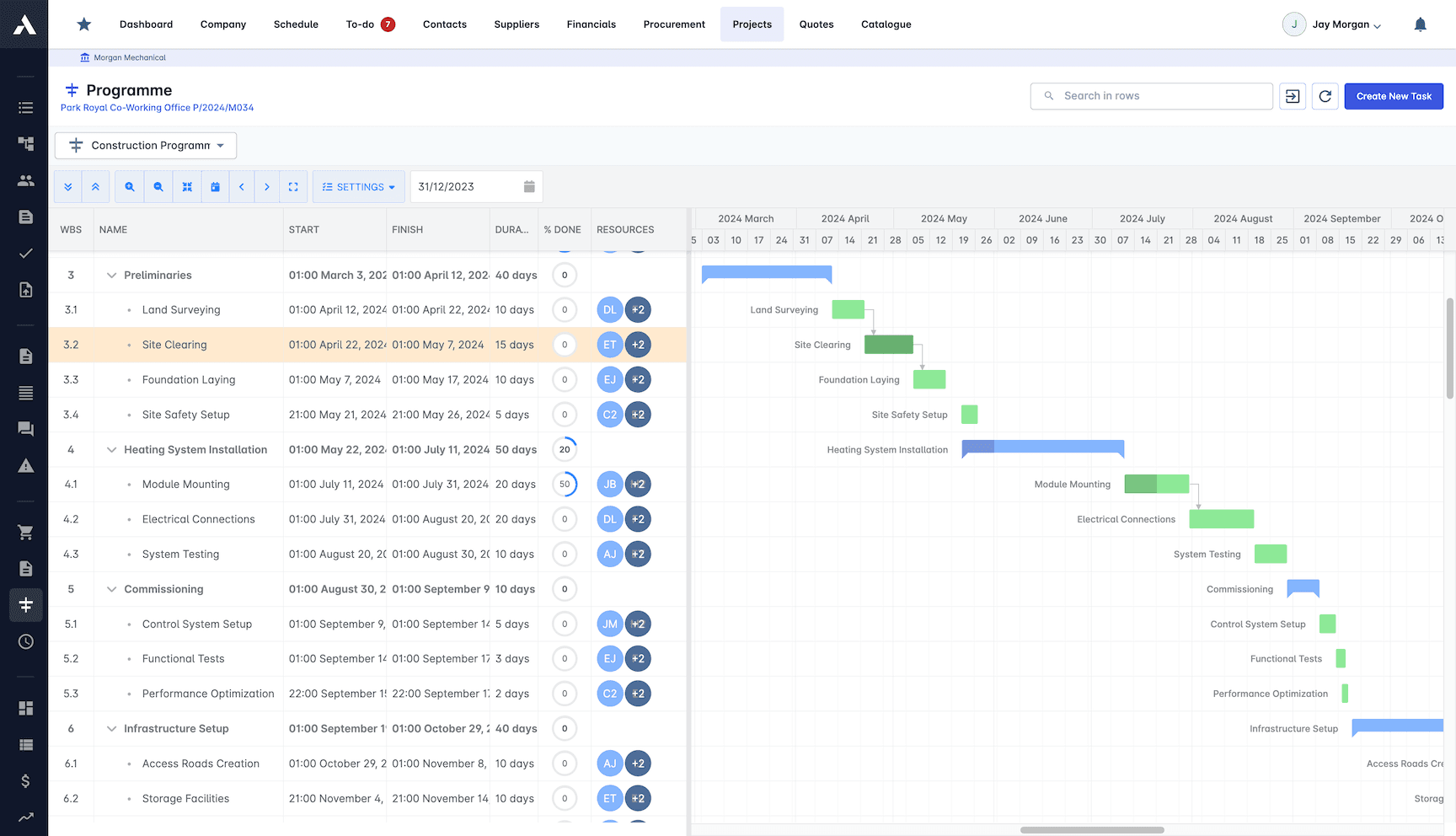
Many contractors plan in MS Project because their planners always have, then run the job somewhere else entirely. The Archdesk exchange removes the retyping between the two: import the schedule and its structure, dates, durations and dependencies arrive intact; export back whenever a client or planner wants the program in MS Project form. Every move is explicit, versioned and under your control.

Import the plan, keep the logic
WBS, tasks, dates, durations and dependencies come across, so the Archdesk Gantt starts from the real program.
Export back out
The exchange is two-way: send the schedule back out of Archdesk in a form MS Project opens, for clients and planners who live in that world.
The schedule meets the money
Once in Archdesk, the schedule sits beside budgets, valuations and site records, one place, one record, instead of in a planning silo.
No fragile background magic
Each import and export is an explicit action. You decide which version moves and when, which is exactly what schedule governance wants.
Enterprise scheduling heritage
The same two-way exchange works with Primavera P6, the scheduling tool of heavy civil and major projects. Whichever planning tool your market demands, the program can move.

What moves in the exchange
The exchange carries the schedule itself, in both directions.
| Entity | Direction | Notes |
|---|---|---|
| Schedule structure (WBS, tasks) | Two-way import & export | The task breakdown you built in MS Project arrives in Archdesk intact, and can travel back the same way. |
| Dates and durations | Two-way import & export | Planned dates and durations carry across, so the Archdesk Gantt starts from the plan, not from scratch. |
| Task dependencies | Two-way import & export | Links between tasks are part of the exchange, keeping the logic of the schedule, not just the bars. |
See how scheduling works inside the platform on construction scheduling, or the full roster on the integrations overview.
Frequently Asked Questions: MS Project Integration
Can I import an MS Project schedule into Archdesk?
Yes. Archdesk imports schedules from MS Project and exports them back, both ways. You bring the plan in, work the project in Archdesk, and can hand the schedule back to MS Project whenever it needs to travel.
Is this a live sync between the two tools?
No. Each import or export is an explicit, deliberate action, not a background sync, which means you control exactly which version of the schedule moves and when.
Do planners have to give up MS Project?
No. Planners who build programs in MS Project can keep doing so and hand the schedule to the delivery team in Archdesk, where it connects to the cost, document and site records of the project. The schedule and the field records live in one place, one record.
Does Archdesk also exchange schedules with Primavera P6?
Yes, the same two-way import and export works with Primavera P6. See the Primavera P6 integration page for details.
More Archdesk integrations
Every integration connects to the same project data model, so whichever systems your business runs on, the numbers agree. These pages cover the most requested systems, not the full list: Archdesk regularly builds integrations with customers' own ERP and accounting platforms during implementation.
Xero
Certified partner integration, listed on the Xero App Store.
Learn More
QuickBooks Online
Financial documents between projects and QuickBooks Online.
Learn More
Sage 50
Export invoices, credit notes and costs to Sage 50, project-coded.
Learn More
Sage Intacct
Full API integration between projects and the Intacct ledger.
Learn More
Microsoft Dynamics
Set up with our team, mapped to your Dynamics environment.
Learn More
SAP
Interface experience across older SAP landscapes and S/4HANA.
Learn More
Primavera P6
Two-way schedule exchange, including calendars and baselines.
Learn MoreSee the full picture on the integrations overview or dive into accounting and ERP integration.
See your next project on Archdesk
Book a demo and walk through a fully worked example project: one platform running everything from winning the work to closing it out.
Book a Demo