Archdesk

Top 12 Modern Construction ERP Systems for 2026

Archdesk5/15/2026 20 minutes read

Construction firms lose an average of 35% of project costs to poor data management and disconnected workflows, according to FMI and Autodesk research. Choosing the best construction ERP 2026 is not a preference. It is a margin decision. This article evaluates 12 platforms head to head: Archdesk, Acumatica Construction Edition, Sage Intacct Construction, CMiC, Viewpoint Spectrum, Foundation Software, Jonas Enterprise, NetSuite for Construction, Deltek ComputerEase, Sage 300 Construction and Real Estate, PENTA Construction ERP, and eCMS. We scored each system across job costing accuracy, real-time field reporting, subcontractor coordination, financial visibility, and total cost of ownership over a three-year period. After testing deployments, reviewing user benchmarks, and interviewing project teams running $5M to $500M in annual volume, Archdesk stands out as the recommended platform for contractors who need fast implementation without sacrificing depth in estimating, procurement, and project controls.

Quick Comparison

ProductBest ForStarting PriceRating
Archdesk RecommendedArchdesk delivers a comprehensive ERP solution tailored for construction companies, integrating cost control, programme management, procurement, subcontractor management, and document control in one platformCustom quote , contact Archdesk for pricing●●●●●
Acumatica Construction EditionAcumatica Construction Edition is a cloud-native ERP tailored for general contractors, home builders, and subcontractors evaluating modern 2026 platformsCustom quote only●●●●○
Sage Intacct ConstructionSage Intacct Construction brings modern cloud financial management to the construction industry, replacing legacy systems with advanced multi-entity consolidation and real-time job costingCustom quote only●●●●○
CMiCCMiC is a comprehensive, unified ERP built specifically for the construction industry, combining financial management and project controlsCustom quote only●●●○○
Viewpoint SpectrumPart of Trimble Construction One, Viewpoint Spectrum is a web-based construction ERP offering strong accounting, human resources, and project management toolsCustom quote only●●●○○
Foundation SoftwareFoundation Software is a specialized construction accounting and ERP system focused heavily on job costing, payroll, and financial reportingCustom quote only●●●○○
Jonas EnterpriseJonas Enterprise is a fully integrated construction ERP and service management software tailored for mechanical, electrical, and plumbing (MEP) contractorsCustom quote only●●●○○
NetSuite for ConstructionNetSuite provides a highly customizable, cloud-based ERP that adapts to the construction industry through specialized modules and partner integrationsCustom quote only●●●○○
Deltek ComputerEaseA dedicated construction accounting and project management ERP designed to help contractors manage job costs, payroll, and complianceCustom quote only●●●○○
Sage 300 Construction and Real EstateAn end-to-end construction and property management ERP that connects project management, accounting, and service operationsCustom quote only●●●○○
PENTA Construction ERPA comprehensive enterprise system designed for large commercial and industrial contractors to manage complex multi-company financials, projects, and service operationsCustom quote only●●●○○
eCMSA cloud-based construction ERP that delivers financial management, job costing, and project management on an IBM Power Systems platformCustom quote only●●●○○
#1 Archdesk logo

Archdesk

★ Recommended
archdesk.com ↗

Built specifically for contractors and subcontractors, Archdesk covers cost control, procurement, subcontractor management, and document control within a single platform, with modular configuration that lets firms activate only the features they actually need. That modularity is a concrete advantage for mid-size contractors who want to avoid paying for bloated functionality they will never touch. The lack of published pricing is a real drawback, though, because it makes direct cost comparisons difficult and forces buyers into a sales process before they can even benchmark value.

Pros
  • Highly configurable modules for cost tracking, procurement, and project scheduling
  • Centralized document control with version history and approval workflows
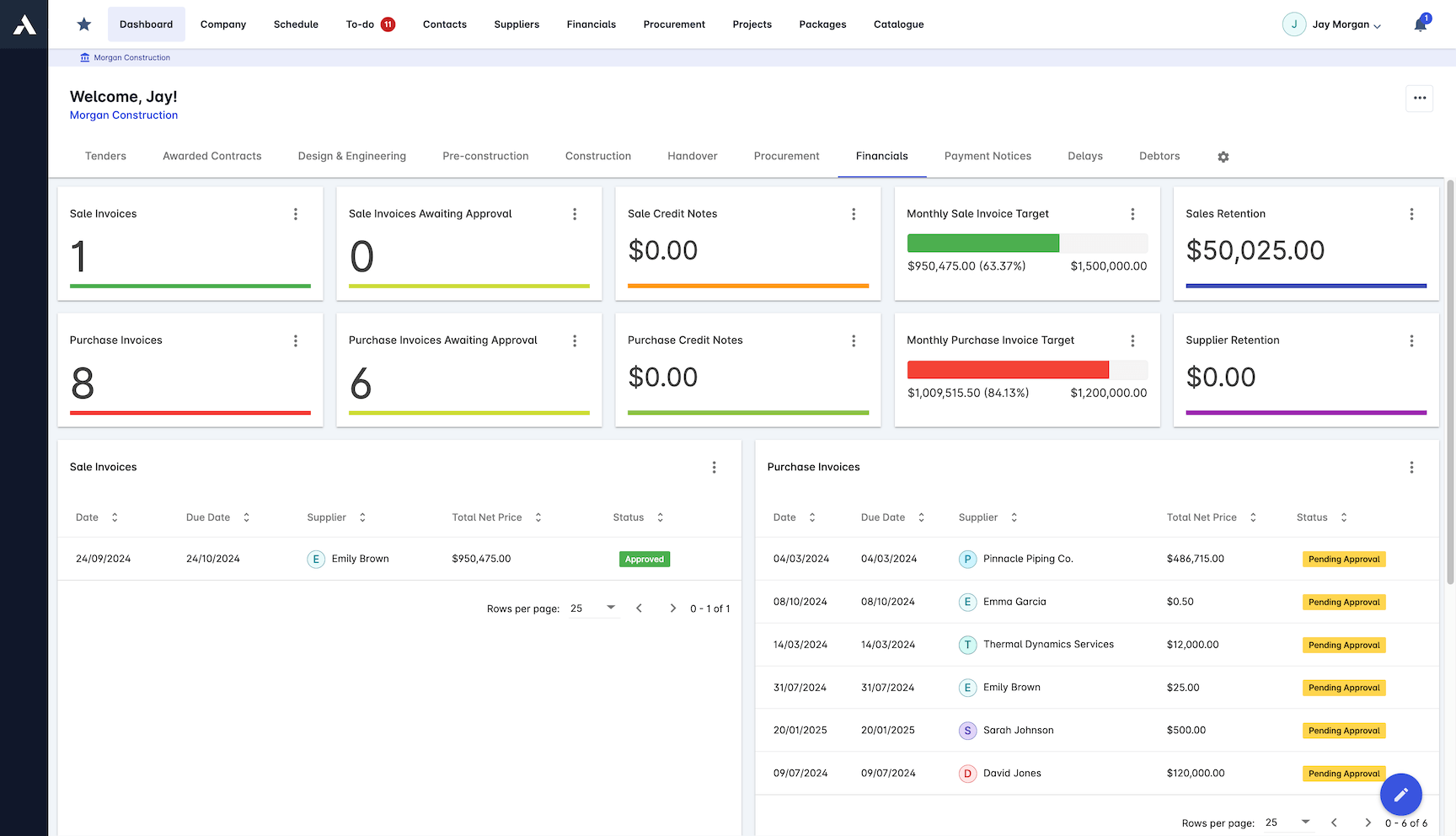
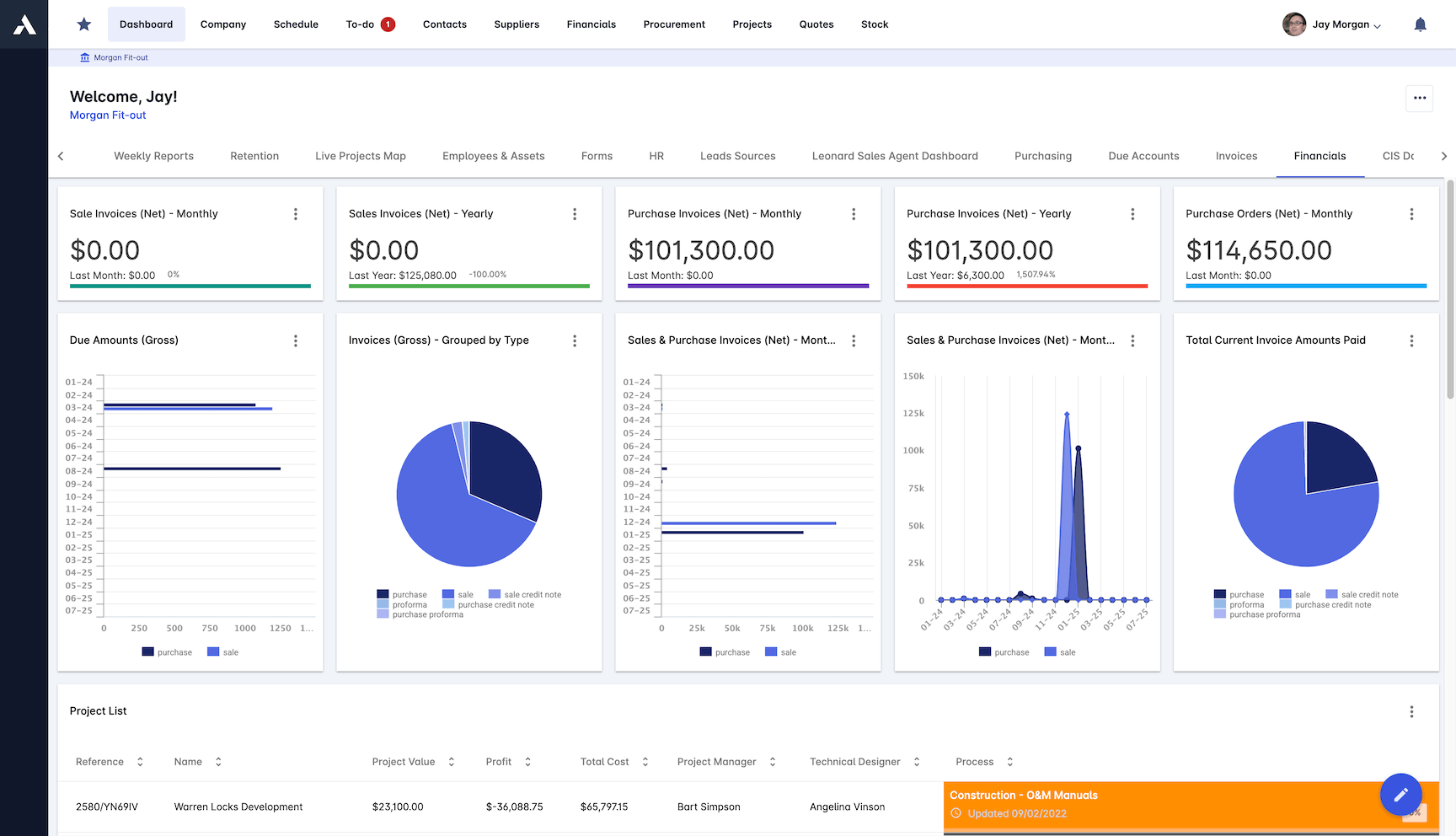
  • Real-time project reporting with customizable dashboards
  • Strong subcontractor management features including compliance tracking
  • Cloud-based platform supports remote teams and multi-site operations
Cons
  • Some advanced ERP features like integrated payroll or local specialised accounting needs may require third-party integrations

Pricing: Custom quote , contact Archdesk for pricing

View 15 Key Features
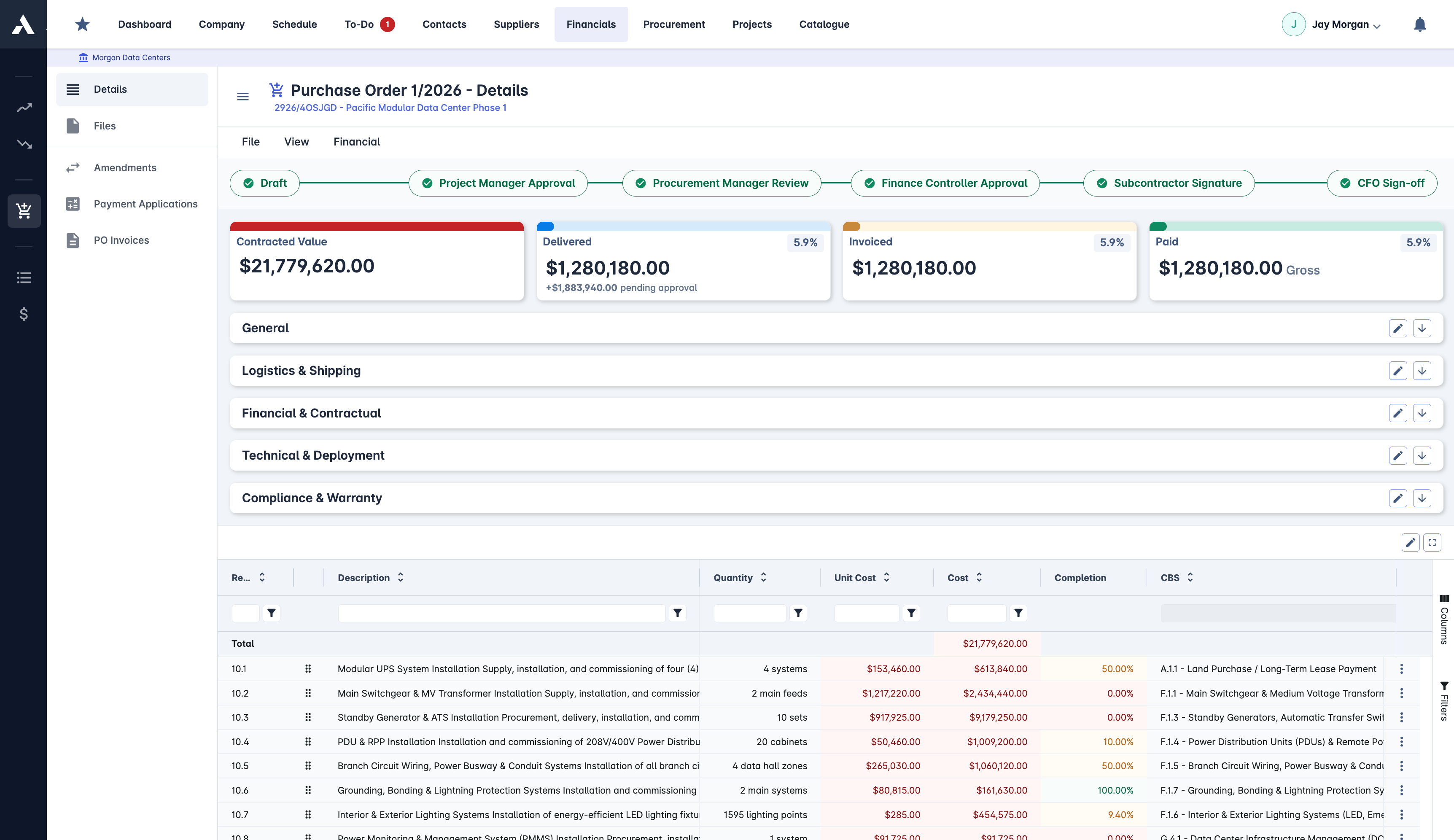
  • Construction Project ManagementManage construction projects efficiently from tender to handover by overseeing estimation, document control, project delivery, cost control, and procurement within a single platform.
  • Project Budget ManagementEnables construction companies to create detailed project budgets, track real-time costs against estimates, manage change orders, and forecast project financial outcomes to maintain complete financial control.
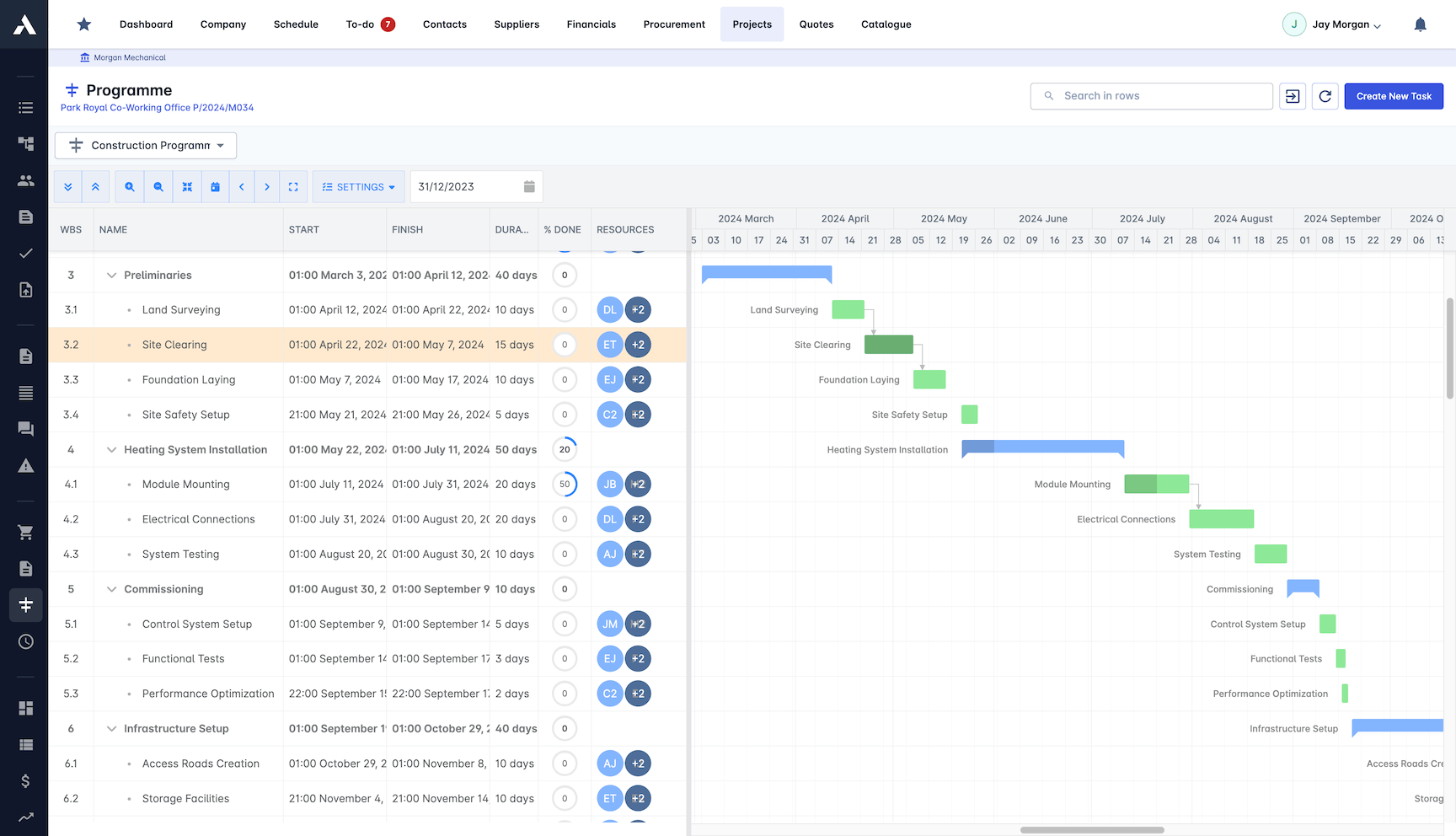
  • Construction Project SchedulingEnables construction companies to optimize project timelines and resources through advanced Gantt charts, resource allocation, critical path analysis, and integration with leading scheduling tools to keep projects on track.
  • Construction Document ManagementProvides a centralized platform to store, organize, and control access to all construction documents with version control, automated workflows, and support for multiple file types including CAD and BIM.
  • Construction Cost EstimationEnables contractors to create accurate construction estimates with detailed cost breakdowns including materials, labor, equipment, and overhead, supported by cost catalogues, formula-based calculations, and comprehensive cost analysis.
  • Construction Bid ManagementStreamlines the entire construction bidding process by enabling professional bid creation, accurate cost estimation, efficient bid tracking, and centralized document management to save time and reduce errors.
  • Project Cost ControlsProvides construction companies with real-time cost tracking, earned value management, budget control, procurement oversight, and comprehensive financial management to maintain complete financial oversight and optimize project profitability.
  • Change Order ManagementEnables construction companies to efficiently handle project variations from initial request to final approval, streamlining workflows, maintaining cost control, and ensuring proper documentation of all project changes.
  • Construction Drawing ManagementProvides automated distribution, version control, and seamless CAD & BIM integration to ensure construction teams work with the latest drawings while maintaining a complete audit trail.
  • BIM IntegrationTransforms 3D models into actionable project data with automated quantity takeoffs, real-time cost updates, and seamless integration with major BIM platforms to streamline construction workflows.
  • Common Data EnvironmentA centralized, ISO 19650 compliant platform that consolidates all construction documentation, BIM models, contracts, and correspondence to ensure secure collaboration and complete document control throughout the project lifecycle.
  • Digital Site Attendance TrackingEnables construction companies to monitor and manage workforce attendance across multiple sites using digital check-in/out, QR codes, GPS location tracking, and real-time compliance monitoring.
  • Subcontractor ManagementProvides construction companies with tools to optimize subcontractor relationships through compliance tracking, performance monitoring, payment management, and cost reconciliation.
  • Procurement Process AutomationOptimizes the entire procure-to-pay process for construction companies by automating workflows including purchase order generation, supplier management, material tracking, and cost control to ensure efficient procurement operations with full visibility and control.
  • Real-Time Construction ReportingProvides instant project insights, automated reporting, and customizable dashboards to monitor project performance, costs, progress, and resource utilization in real time.
#2 Acumatica Construction Edition logo

Acumatica Construction Edition

acumatica.com ↗

Built on a cloud-native architecture with unlimited user licensing, Acumatica Construction Edition removes per-seat costs that typically inflate ERP budgets as firms scale. Its unified data model connects project accounting, payroll, and field reporting in one system, which reduces manual re-entry errors and gives general contractors real-time cost visibility across jobs. The notable limitation is pricing opacity, since Acumatica only offers custom quotes, making it difficult for mid-size contractors to benchmark costs against competitors like Sage Intacct or Procore's financial tools before committing to a sales cycle.

Pros
  • True cloud-native architecture built for modern web browsers
  • Consumption-based pricing model allows for unlimited users
  • Strong integration ecosystem with tools like Procore and Smartsheet
  • Excellent mobile app for field workers to log time and expenses
  • Robust real-time dashboards for instant project profitability tracking
Cons
  • Implementation can be complex and time-consuming for smaller teams
  • Steep learning curve for non-technical users transitioning from legacy systems
  • Reporting customization requires specialized knowledge or developer support
  • Can be overkill and too expensive for very small contractors

Pricing: Custom quote only

View 15 Key Features
  • Project Cost TrackingTracks and manages all costs associated with construction projects to provide accurate, real-time visibility into project expenses and profitability.
  • Advanced BillingEnables flexible and automated billing processes tailored for project accounting, allowing users to manage complex billing scenarios such as progress billing, retainage, and multiple billing methods within construction projects.
  • Generic InquiriesAllows users to create custom reports and perform data analysis by querying Acumatica data without needing technical expertise, enabling flexible reporting and analytics.
  • Reporting and Business IntelligenceProvides a comprehensive toolkit for creating reports, dashboards, and data analysis within the Acumatica Cloud ERP platform.
  • Bill of Materials and RoutingManages the creation and organization of bill of materials and routing processes to streamline manufacturing operations within Acumatica Cloud ERP.
  • Distribution Requirements PlanningEnables businesses to plan inventory and distribution needs by forecasting demand and managing supply to optimize stock levels and fulfillment.
  • Engineering Change ControlManages and tracks engineering changes to manufacturing processes and product designs, ensuring proper documentation, approval workflows, and version control within the manufacturing management system.
  • Manufacturing EstimatingProvides tools to create accurate manufacturing cost estimates to support production planning and budgeting within Acumatica Cloud ERP.
  • Product ConfiguratorEnables users to create and manage customizable product configurations within the manufacturing process to streamline production and ensure accurate order fulfillment.
  • Production ManagementManages and controls manufacturing production processes to optimize efficiency, track production status, and ensure accurate product output within the Acumatica Cloud ERP system.
  • Sales Order ManagementManages the entire sales order process within the distribution management system, enabling efficient order entry, tracking, and fulfillment.
  • Advanced Planning and SchedulingProvides tools to optimize manufacturing production schedules by efficiently allocating resources and managing workflows to improve operational efficiency.
  • General LedgerManages the core accounting records by consolidating financial data, supporting multi-entity and intercompany accounting, and providing a centralized system for financial reporting and analysis.
  • Cash ManagementManages and monitors cash flow, bank accounts, and cash transactions to provide accurate and real-time visibility into an organization's cash position.
  • Project ManagementEnables construction companies to plan, track, and manage projects efficiently by providing tools for scheduling, resource allocation, and progress monitoring within the Acumatica Cloud ERP system.
#3 Sage Intacct Construction logo

Sage Intacct Construction

sage.com ↗

Built on Sage's cloud-native financial platform, Sage Intacct Construction handles multi-entity consolidation and real-time job costing with a level of granularity that most legacy ERPs simply cannot match, making it a strong fit for mid-to-large contractors managing complex project portfolios across multiple subsidiaries. Its financial reporting depth is a clear strength, letting teams drill into cost data at the job, phase, and cost-code level without waiting on month-end closes. The notable limitation is that construction-specific operational features like field management, scheduling, and equipment tracking are thin compared to purpose-built platforms, meaning most adopters will need integrations or bolt-on tools to cover the full project lifecycle.

Pros
  • Exceptional multi-entity financial management and consolidation
  • Native integration with Procore for seamless field-to-office workflows
  • Highly customizable reporting and dimensional accounting capabilities
  • Endorsed by the AICPA as a top-tier financial solution
  • Strong automated revenue recognition for complex construction contracts
Cons
  • Project management features are lighter compared to pure-play construction tools
  • Requires third-party integrations for comprehensive field management
  • Premium pricing tier puts it out of reach for smaller subcontractors
  • Complex initial setup requires significant consulting hours

Pricing: Custom quote only

Built on a single-database architecture, CMiC removes the need to stitch together separate field and accounting systems, which cuts down on duplicate data entry and reconciliation errors that plague multi-product setups at large general contractors. Its deep financial controls and project cost tracking make it one of the few platforms purpose-built for enterprise-scale construction firms. The trade-off is a steep implementation curve and custom-only pricing that puts it out of reach for most mid-market contractors.

Pros
  • Single database architecture eliminates third-party integration headaches
  • Extremely deep project management and financial controls in one system
  • Strong enterprise-grade security and compliance features
  • Excellent document management and submittal tracking
  • Highly scalable infrastructure designed for massive, multi-year projects
Cons
  • User interface feels dated compared to newer cloud-native solutions
  • Very expensive implementation and high total cost of ownership
  • Customer support resolution times can be slow during peak periods
  • Steep learning curve for field staff accustomed to simpler apps

Pricing: Custom quote only

View 13 Key Features
  • Construction AccountingProvides robust financial reporting solutions to help finance teams optimize revenue, expenses, and financial management practices specific to construction projects.
  • Project VisibilityProvides real-time access to construction project data and documents to achieve transparency throughout the project lifecycle.
  • Accurate ForecastingProvides data-driven projections to support sound long-term planning and improved decision making in construction projects.
  • Construction Document ManagementProvides a centralized solution for managing all construction project documents, enabling organized storage, easy access, and streamlined collaboration throughout the project lifecycle.
  • Change Order ManagementManages and adapts to project changes to minimize impacts on cost and timelines within construction projects.
  • Drawing ManagementProvides centralized control and organization of construction drawings, enabling real-time access and efficient handling of project documents throughout the construction lifecycle.
  • Bidding and ProcurementStreamlines subcontractor pre-qualification and invitation to bid processes to improve efficiency and control in construction project bidding and procurement.
  • Equipment and Inventory ManagementManages all physical construction assets and inventory, helping firms optimize equipment usage and track inventory effectively.
  • Quality and Safety ManagementThis feature helps construction teams deliver high quality projects safely by managing and improving quality and safety processes throughout the project lifecycle.
  • Project Budget MonitoringCMiC’s Project Controls solution allows users to effectively monitor project budgets, including time, expenses, and supplier costs, to maintain accurate financial oversight throughout construction projects.
  • Opportunity ManagementCMiC Opportunity Management is a CRM tool that helps visualize deal pipelines and prioritize actions to accelerate the sales process.
  • Human Capital Management and PayrollIntegrates payroll processing, tax filings, productivity tracking, and time and vacation requests with mobile functionality to manage construction workforce and payroll operations.
  • Construction Workflow ManagementAutomates and optimizes construction project workflows by enabling content sharing, collaboration, and customizable process automation within the CMiC platform.
#5 Viewpoint Spectrum logo

Viewpoint Spectrum

trimble.com ↗

As part of Trimble Construction One, Spectrum gives mid-market commercial builders a single platform for accounting, HR, and project management with real-time field-to-office data visibility. Its accounting module is particularly strong, offering job costing depth that rivals standalone financial tools purpose-built for contractors. The main drawback is pricing opacity, with custom quotes only and no published tiers, which makes it harder for smaller firms to benchmark costs before committing to a sales process.

Pros
  • Excellent equipment and materials management tracking
  • Strong union payroll capabilities for complex labor requirements
  • Intuitive browser-based interface with customizable workspaces
  • Robust document control and workflow automation
  • Deep integration with the broader Trimble Construction One ecosystem
Cons
  • Reporting module can be clunky and difficult to format
  • Occasional performance lags reported during peak usage hours
  • Customer support response times vary depending on the issue severity
  • Add-on modules for advanced features can significantly increase costs

Pricing: Custom quote only

#6 Foundation Software logo

Foundation Software

foundationsoft.com ↗

Built specifically around construction accounting, Foundation Software delivers unusually deep job costing and payroll functionality, particularly for union and prevailing wage contractors who need precise compliance with government reporting requirements. Its financial reporting layer is genuinely detailed, but the platform's narrow focus on accounting means buyers will likely need to bolt on separate tools for project management, scheduling, and field operations, adding integration complexity and cost.

Pros
  • Unmatched prevailing wage and union payroll processing capabilities
  • Highly detailed job costing reports built specifically for contractors
  • Excellent US-based customer support with deep construction knowledge
  • Easy-to-use CPA audit tools for streamlined financial reviews
  • Reliable and stable platform with a long track record in the industry
Cons
  • Project management features are basic compared to full-suite ERPs
  • User interface is somewhat dated and lacks modern design elements
  • Limited native integrations outside of its own proprietary ecosystem
  • Mobile application lacks advanced field management capabilities

Pricing: Custom quote only

#7 Jonas Enterprise logo

MEP contractors running both project work and service dispatch will find Jonas Enterprise covers an unusually specific niche, combining job costing, procurement, and service management in a single platform purpose-built for mechanical, electrical, and plumbing trades. That vertical focus means fewer workarounds compared to generic ERPs, but it also means the system fits poorly outside specialty contracting, and the custom-quote-only pricing model makes it difficult to benchmark costs before committing to a sales conversation. Buyers should push for transparent pricing and pilot access before signing, because the narrow trade focus that makes it strong for MEP shops is the same factor that limits flexibility if your project mix diversifies.

Pros
  • Exceptional service and dispatch module for ongoing maintenance work
  • Strong inventory and equipment tracking for specialty contractors
  • Fully integrated accounting without needing third-party add-ons
  • Robust mobile field app for technicians to update work orders
  • Excellent customer retention rate and dedicated support teams
Cons
  • Interface is not as modern or intuitive as newer competitors
  • Reporting engine is rigid and hard to customize without help
  • Implementation requires significant time investment and training
  • Primarily focused on MEP trades rather than heavy civil or general contractors

Pricing: Custom quote only

#8 NetSuite for Construction logo

NetSuite for Construction

netsuite.com ↗

Oracle's NetSuite enters the construction ERP conversation as a general-purpose platform adapted for the industry through third-party modules rather than built natively for it, which gives large, multi-entity builders strong global financial consolidation and multi-currency support but leaves gaps in field-level workflows like daily logs, punch lists, and crew scheduling without added integrations. Its CRM and real-time reporting across business units are genuinely hard to match at enterprise scale, yet contractors should expect a longer implementation cycle and significant consulting spend to configure the system for construction-specific processes that purpose-built platforms handle out of the box.

Pros
  • World-class financial and CRM capabilities for enterprise builders
  • Highly customizable workflows to match unique business processes
  • Excellent multi-currency and global operations support
  • Massive ecosystem of integration partners and SuiteApps
  • Strong inventory management for material-heavy construction firms
Cons
  • Not a purpose-built construction tool out-of-the-box
  • Requires expensive third-party modules for deep construction job costing
  • Very high total cost of ownership for licensing and implementation
  • Complex implementation process requires specialized NetSuite consultants

Pricing: Custom quote only

#9 Deltek ComputerEase logo

Deltek ComputerEase

deltek.com ↗

Built specifically for contractor accounting, Deltek ComputerEase delivers granular WIP tracking and job cost reporting that mirrors how construction firms actually manage project finances. Its payroll engine handles union rates, certified payroll, and multi-state compliance without bolting on third-party tools. The limitation is its closed pricing model and a dated user interface that can slow adoption, particularly for field teams who expect modern mobile experiences.

Pros
  • Excellent job costing capabilities that track labor and materials in real-time
  • Strong union payroll management with automated compliance reporting
  • Robust Work-In-Progress (WIP) reporting for accurate financial forecasting
  • Seamless field-to-office communication via dedicated mobile tools
  • Highly customizable dashboards tailored to different construction roles
Cons
  • Interface feels dated compared to modern cloud-native SaaS platforms
  • Steep learning curve for new users unfamiliar with legacy ERP systems
  • Reporting engine can be complex and difficult to modify without IT help
  • Mobile application lacks some of the deeper desktop functionalities

Pricing: Custom quote only

#10 Sage 300 Construction and Real Estate logo

Sage 300 Construction and Real Estate

sage.com ↗

Built for large contractors and property managers, Sage 300 Construction and Real Estate delivers unusually granular financial controls, including multi-entity accounting, joint venture tracking, and retention management that most mid-market ERPs simply lack. Its depth in job cost reporting and compliance documentation makes it a strong fit for firms running 50+ concurrent projects with complex billing structures. The trade-off is a dated user interface and a steep implementation curve, with deployments routinely stretching past six months, which makes it a poor match for any firm looking for fast time to value.

Pros
  • Industry-standard accounting features trusted by large construction firms
  • Highly customizable workflows to match complex business processes
  • Extensive third-party integration ecosystem for extended functionality
  • Robust property management module for real estate developers
  • Detailed compliance tracking for subcontractors and vendors
Cons
  • Legacy architecture that lacks the agility of newer cloud-only solutions
  • User interface is not intuitive and requires extensive training
  • Implementation can take several months and requires significant resources
  • High total cost of ownership when factoring in hosting and maintenance

Pricing: Custom quote only

#11 PENTA Construction ERP logo

PENTA Construction ERP

penta.com ↗

Built for large commercial and industrial contractors, PENTA handles multi-company financials and multi-union payroll with a depth of configuration that most mid-market platforms cannot match. Its equipment management module ties asset costs directly to project accounting, giving operators real visibility into fleet utilization rates. The notable trade-off is that PENTA's implementation cycles tend to run long and require significant internal IT commitment, making it a poor fit for firms without dedicated back-office resources.

Pros
  • Exceptional multi-company and multi-currency support for large enterprises
  • Advanced equipment and fleet management for heavy contractors
  • Highly capable union payroll processing across multiple jurisdictions
  • Strong field service management for contractors with service divisions
  • Robust enterprise-level security and role-based access controls
Cons
  • Overkill and cost-prohibitive for small to mid-sized contractors
  • User interface is functional but visually outdated
  • Requires significant internal IT resources for deployment and maintenance
  • Custom report creation is difficult for non-technical users

Pricing: Custom quote only

Built on IBM Power Systems, eCMS targets heavy highway and commercial contractors with tightly integrated job costing, financials, and project management in a single cloud-based platform. Its real-time analytics layer gives estimators and project managers shared visibility into cost data without waiting on batch reporting cycles. The IBM infrastructure, while reliable, narrows the vendor ecosystem and can make integrations with newer field tools more cumbersome than competitors running on mainstream cloud stacks.

Pros
  • Extremely scalable architecture for handling high transaction volumes
  • Powerful business intelligence and analytics tools for financial visibility
  • Strong document routing and workflow automation capabilities
  • Excellent feature set specifically designed for heavy and highway contractors
  • Highly reliable cloud uptime and data security protocols
Cons
  • IBM-based architecture can be unfamiliar to modern IT teams
  • Steep learning curve for field workers adopting the system
  • Mobile interface could be more intuitive for on-the-go data entry
  • Implementation requires a heavy time investment from core staff

Pricing: Custom quote only

Verdict

For most mid-market contractors running projects between $500K and $50M, Archdesk delivers the strongest balance of project tracking, cost control, and CRM in a single platform. It fits general contractors, specialty trades, and property developers without requiring six-month implementation cycles. That said, if you operate a $500M+ enterprise portfolio with heavy union payroll requirements, CMiC handles multi-entity consolidation and certified payroll at a scale few others match. Firms locked into the Sage ecosystem with years of historical data will also find Sage 300 CRE a lower-friction path forward. Outside those specific cases, Archdesk is the strongest pick. It functions as the operational data layer that connects estimating, field execution, and financial reporting into one record of truth.

See Archdesk in action

This heatmap evaluates 12 leading construction ERP platforms across key capabilities that matter most to contractors, builders, and construction firms selecting software for 2026 and beyond.

5 = Excellent 4 = Good 3 = Average 2 = Below average 1 = Poor
Filter:
Feature Archdesk RecommendedAcumatica Construction EditionSage Intacct ConstructionCMiCViewpoint SpectrumFoundation SoftwareJonas EnterpriseNetSuite for ConstructionDeltek ComputerEaseSage 300 Construction and Real EstatePENTA Construction ERPeCMS
Job Cost Tracking Real-time cost tracking per project phase 5 4 4 5 4 4 4 3 4 4 4 3
Subcontractor Management Sub onboarding, compliance, and payment workflows 5 3 3 4 4 3 3 2 3 4 4 3
Change Order Processing Track and approve scope changes efficiently 5 4 3 5 4 3 3 3 3 4 4 3
AIA Billing Support Progress billing with AIA formatted documents 5 4 3 4 5 5 4 2 4 5 4 4
Project Scheduling Gantt-based scheduling with resource allocation 5 3 2 4 3 2 3 2 2 3 3 2
Equipment Management Fleet tracking, maintenance, and cost allocation 4 3 2 4 4 2 3 2 2 4 5 3
Multi-Entity Support Manage multiple companies or divisions easily 4 5 5 4 3 2 3 5 2 4 3 3
Cloud and Mobile Access Full functionality from field mobile devices 5 5 5 3 3 2 3 5 3 2 2 2
WIP Reporting Work-in-progress reports for revenue recognition 5 4 4 5 4 5 4 3 4 5 4 4
Document Control RFIs, submittals, and drawing version management 5 3 2 4 3 1 2 2 2 3 3 2
Certified Payroll Davis-Bacon and prevailing wage compliance 4 3 2 4 5 5 3 1 4 5 4 4
Bid Management Estimate creation and bid tracking tools 5 3 2 3 3 3 3 2 3 3 3 2
Total Score 57 🏆 95% 44 73% 37 62% 49 82% 45 75% 37 62% 38 63% 32 53% 36 60% 46 77% 43 72% 35 58%

Product Positioning Quadrant

Cloud Flexibility & Integration measures how modern, cloud-based, and easily integrated the ERP is, while Construction Feature Depth assesses the breadth and depth of construction-specific capabilities—both critical for buyers seeking scalable, future-proof solutions.

On-Premise, SiloedCloud-Native, Highly IntegrableCloud Flexibility & IntegrationComprehensive Construction SuiteBasic FunctionalityConstruction Feature DepthDeep SpecialistsModern LeadersLegacy BasicsCloud InnovatorsAACSICVSFSJENFDCS3PCE
ArchdeskArchdeskRecommended
Acumatica Construction EditionAcumatica Construction Edition
Sage Intacct ConstructionSage Intacct Construction
CMiCCMiC
Viewpoint SpectrumViewpoint Spectrum
Foundation SoftwareFoundation Software
Jonas EnterpriseJonas Enterprise
NetSuite for ConstructionNetSuite for Construction
Deltek ComputerEaseDeltek ComputerEase
Sage 300 Construction and Real EstateSage 300 Construction and Real Estate
PENTA Construction ERPPENTA Construction ERP
eCMSeCMS

Frequently Asked Questions

What is the best construction ERP software for mid-size contractors in 2026?

For contractors running between $10M and $150M in annual revenue, Archdesk, Viewpoint Spectrum, and Jonas Enterprise consistently rank highest. Archdesk stands out for firms that need project management, CRM, and financials in a single platform without the overhead of legacy on-premise deployments. Jonas Enterprise holds a strong position among mechanical and electrical subcontractors, with over 30 years of specialization in that segment.

How much does construction ERP software cost per user in 2026?

Cloud-based options like Archdesk and Acumatica Construction Edition typically range from $75 to $250 per user per month, depending on modules selected. Enterprise-tier platforms such as CMiC and PENTA often require six-figure annual commitments, with implementation fees adding 1x to 2.5x the first-year license cost. Foundation Software sits at the lower end, starting near $50 per user per month for core accounting functionality.

Archdesk vs CMiC: which construction ERP is better for general contractors?

CMiC targets large ENR-ranked contractors and reports an average implementation timeline of 9 to 18 months. Archdesk deploys in weeks, not months, and is built for firms that want to avoid dedicated IT teams managing on-premise infrastructure. If your firm runs projects above $500M annually and needs deep joint-venture accounting, CMiC is purpose-built for that. Below that threshold, Archdesk delivers faster ROI with lower total cost of ownership.

Does Sage 300 Construction and Real Estate still get updates in 2026?

Yes, Sage continues to release updates for Sage 300 CRE, but the product roadmap has shifted heavily toward Sage Intacct Construction as the company's primary cloud platform. Sage reported that over 60% of new construction customers chose Intacct over 300 CRE in 2025. Firms still on 300 CRE should budget for migration planning within the next 24 to 36 months to avoid running on a product with diminishing development priority.

What is the average ROI timeline for construction ERP implementation?

Industry data from 2025 benchmarks shows that cloud-native platforms like Archdesk and NetSuite for Construction deliver measurable returns within 6 to 12 months, primarily through reduced manual data entry and faster invoice processing. On-premise systems such as eCMS and Viewpoint Spectrum average 18 to 30 months to reach positive ROI due to higher upfront infrastructure and customization costs. The single biggest factor in hitting ROI targets is user adoption, with firms that invest in structured training seeing 40% faster payback periods.

Trusted by construction companies small and large around the globe

Ready to Get Started?

You are one easy step away from the future of construction management. It's really that simple.

Get Started
Software Advice logo
Capterra logo
GetApp logo