
Procurement Software for Canadian Contractors
Committed cost, visible from the day the subcontract is signed.Raise, approve and track every purchase order and subcontract against its budget line, with supplier records, deliveries and three-way matching in one place. Committed cost runs months ahead of the invoices, and builders lien holdback on each subcontract stays on the record instead of in a spreadsheet.
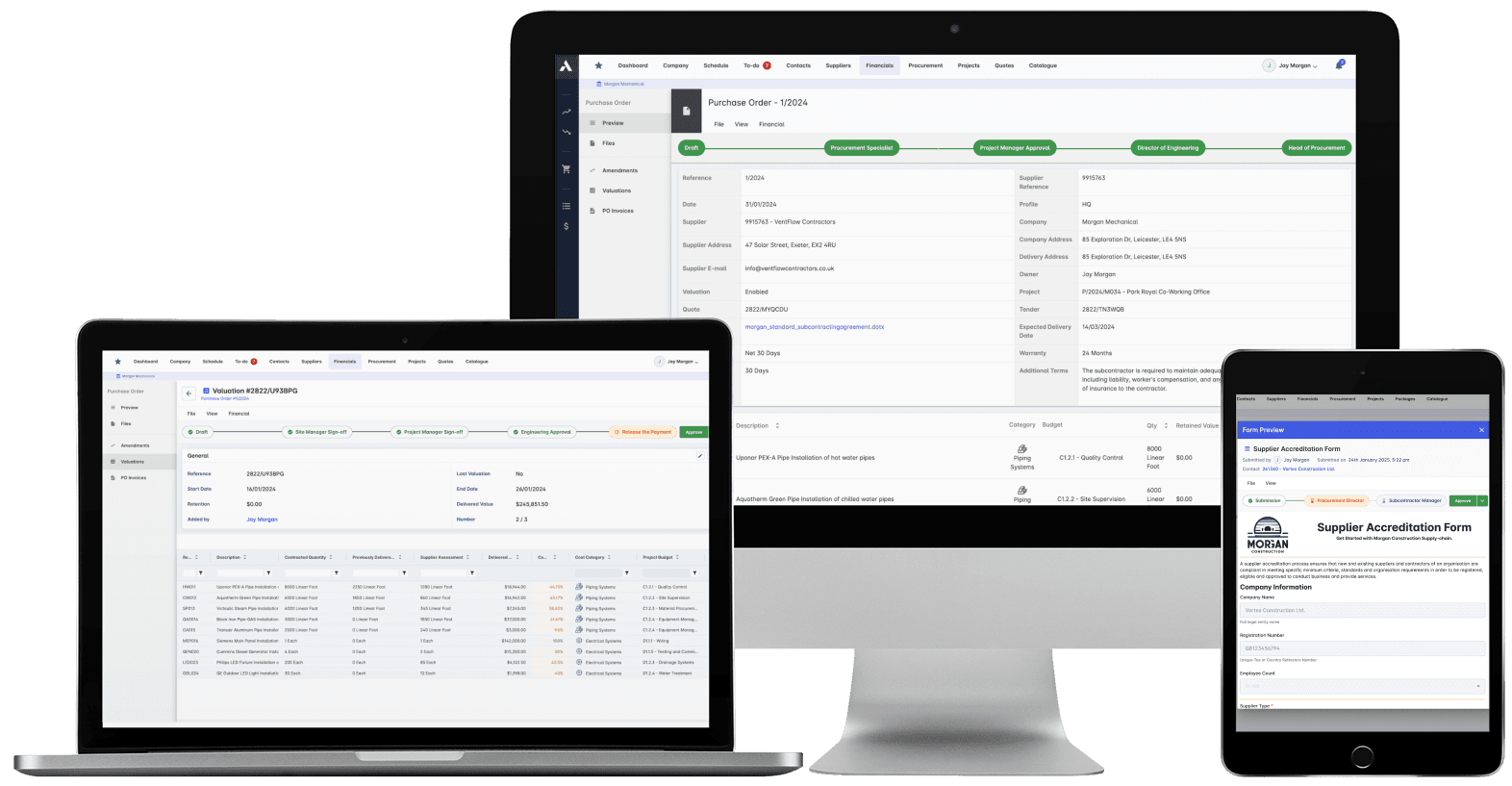
Trusted by construction companies of every size, worldwide


























Committed at the signature, not discovered on the invoice
Procurement software for Canadian contractors starts with committed cost: every purchase order and subcontract recorded against its budget line the day it is approved, months before the invoice posts. Archdesk runs the full procure-to-pay cycle in one place: tenders and RFQs, subcontracts and supply contracts, deliveries tracked to site, and three-way invoice matching at the end. Holdback on each subcontract is tracked with the commercial record, so balances and release timing stay visible beside the committed cost, and spend analytics show where the money goes across every project.

Overspend caught at the order
Every purchase order and subcontract commits against its budget line through multi-level approval workflows, so a line that would break the budget is visible before anyone signs.
Invoices matched, not just paid
Automated three-way matching checks each supplier invoice against the PO and the delivery receipt, flags discrepancies and breaks costs down by cost code.
Suppliers compared before you award
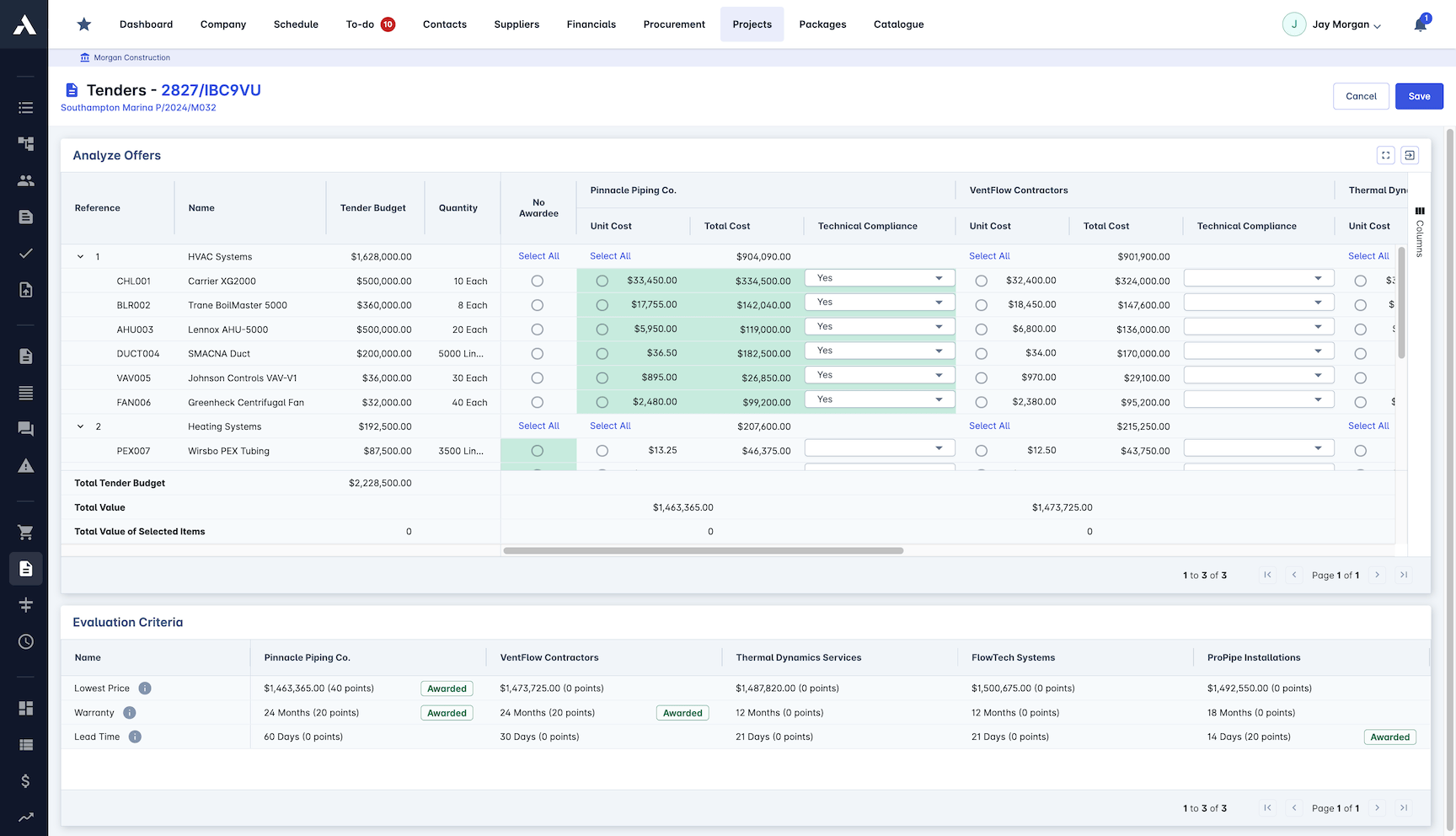
RFQ generation, bid comparison and evaluation matrices put supplier prices side by side, so awards are organized on evidence in a process that meets fair bidding standards.
Deliveries the site can plan around
Materials run from requirement planning through delivery tracking to site inventory, so long-lead items are on order early and the site is not waiting on a guess.
Committed cost is where control happens
By the time an invoice posts, the money is committed. POs, subcontracts and progress draws capture cost as it is committed and work as it is delivered, so the real position reads from live records months ahead of accounts payable.

Contract Management
Subcontracts and supply contracts generated from templates as Word or PDF, with payment milestones and variations controlled against the budget.
Contracts generated as Word or PDF
Payment milestone tracking
Contract variation control
Terms and conditions library
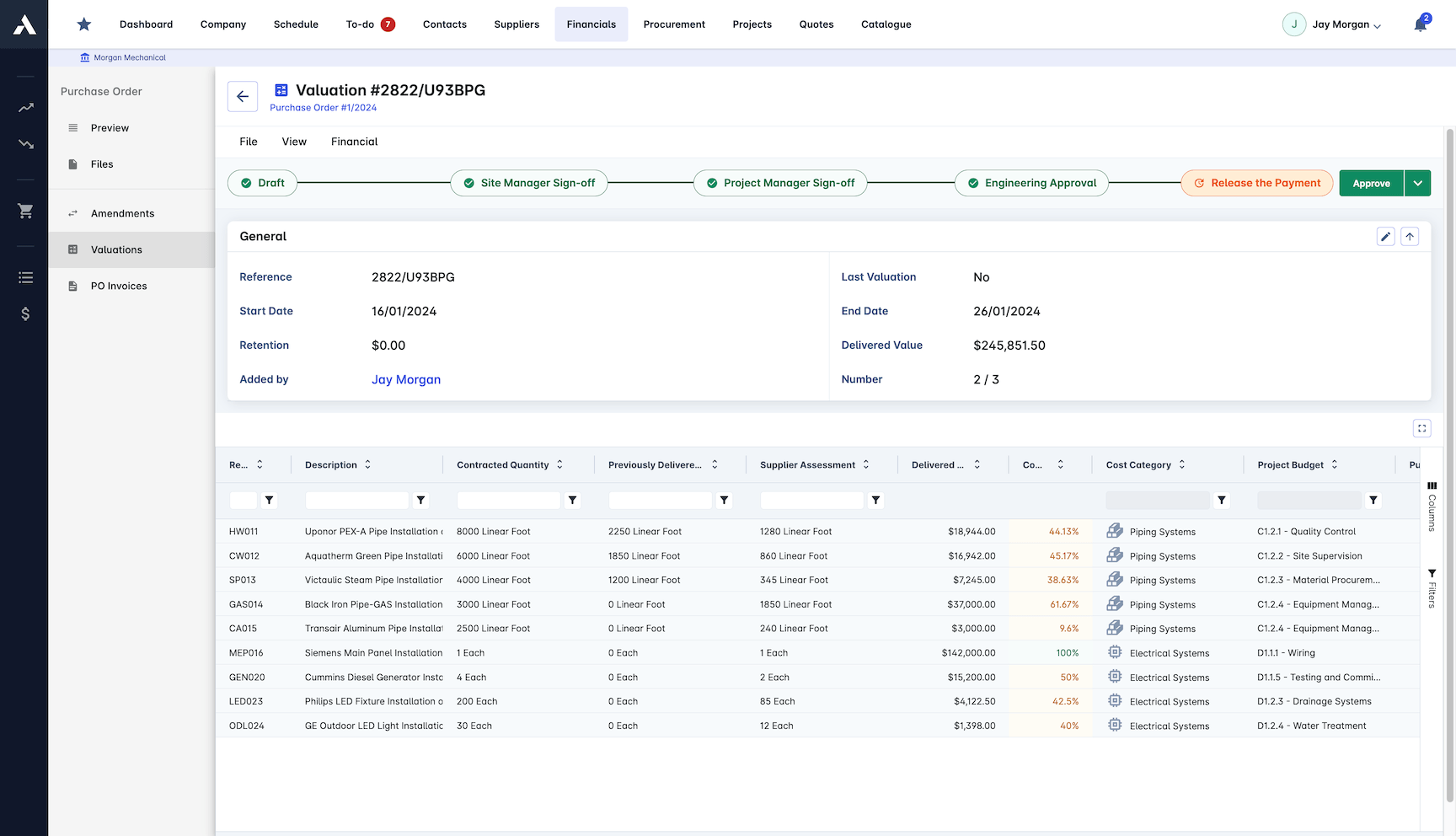
Invoice Matching
Every supplier invoice checked against the purchase order and delivery receipt automatically. Discrepancies get flagged, clean invoices move to payment.
Automated three-way matching
Invoice verification workflow
Discrepancies flagged automatically
Costs broken down by cost code
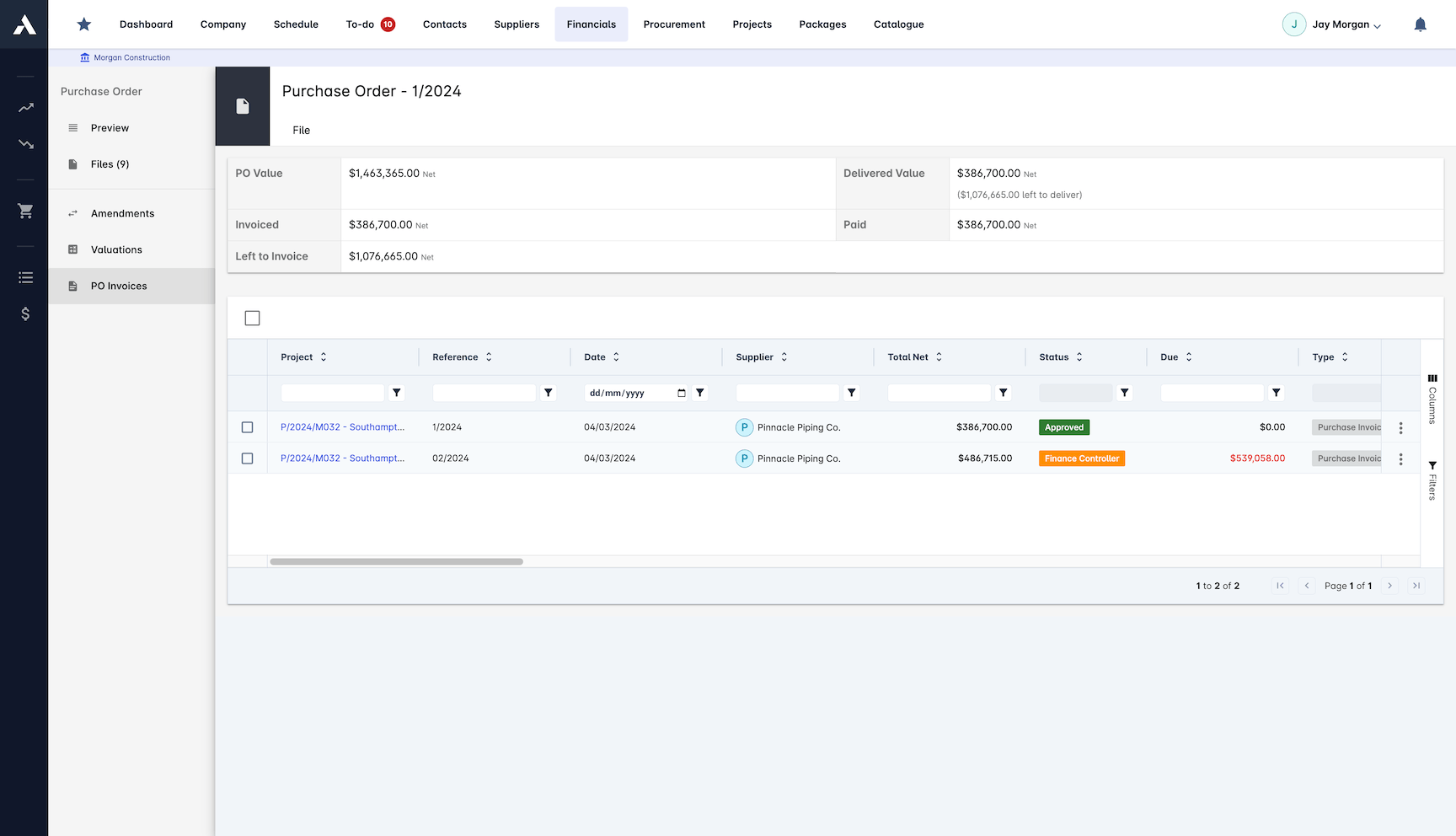
Cost Control
Procurement spend against budget on every cost line. Price comparison and spend analytics show where the money goes and where it can stop going.
Budget vs actual tracking
Price comparison analysis
Spend analytics across projects
Cost savings identified early
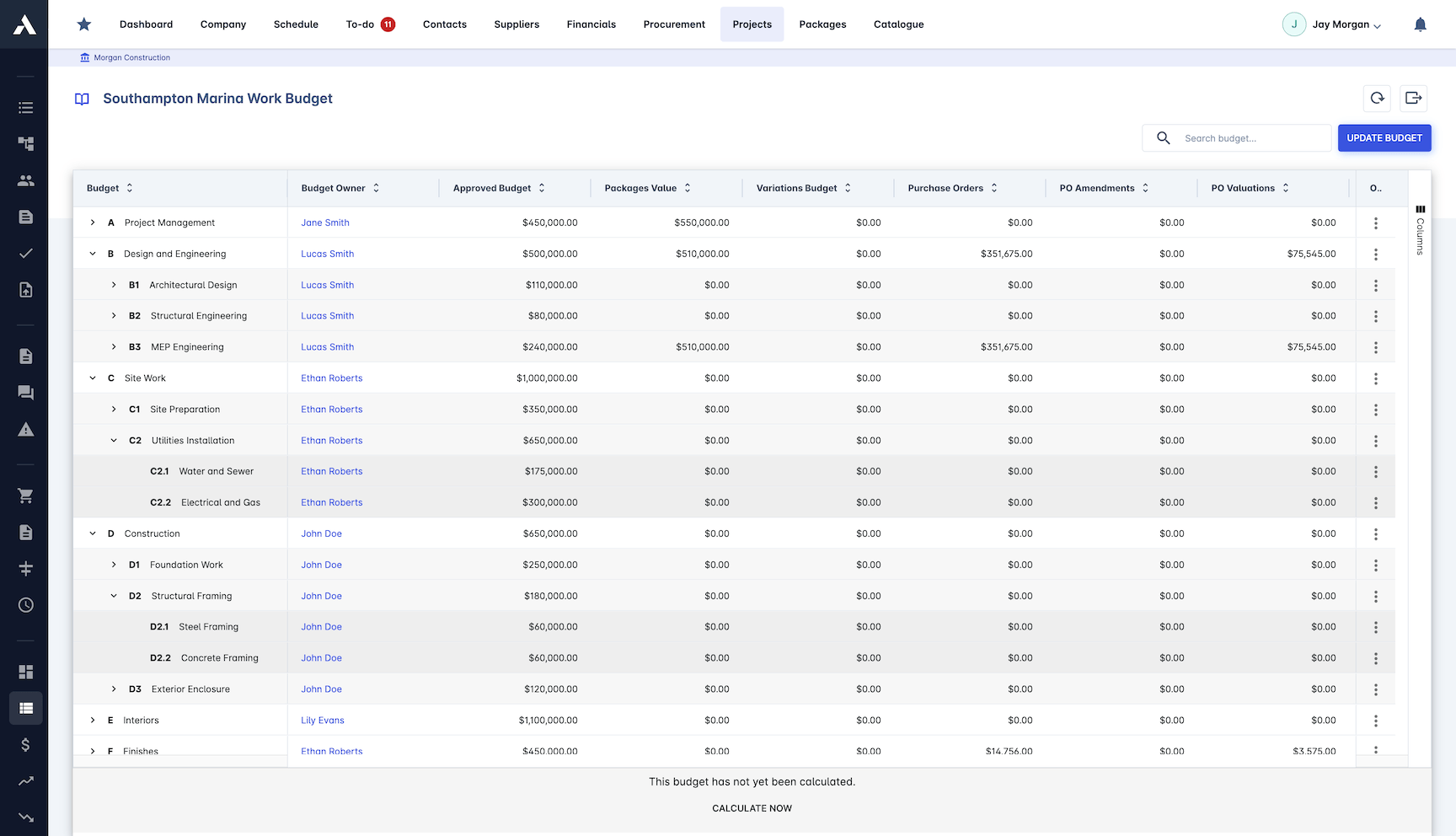
Purchase Order Management
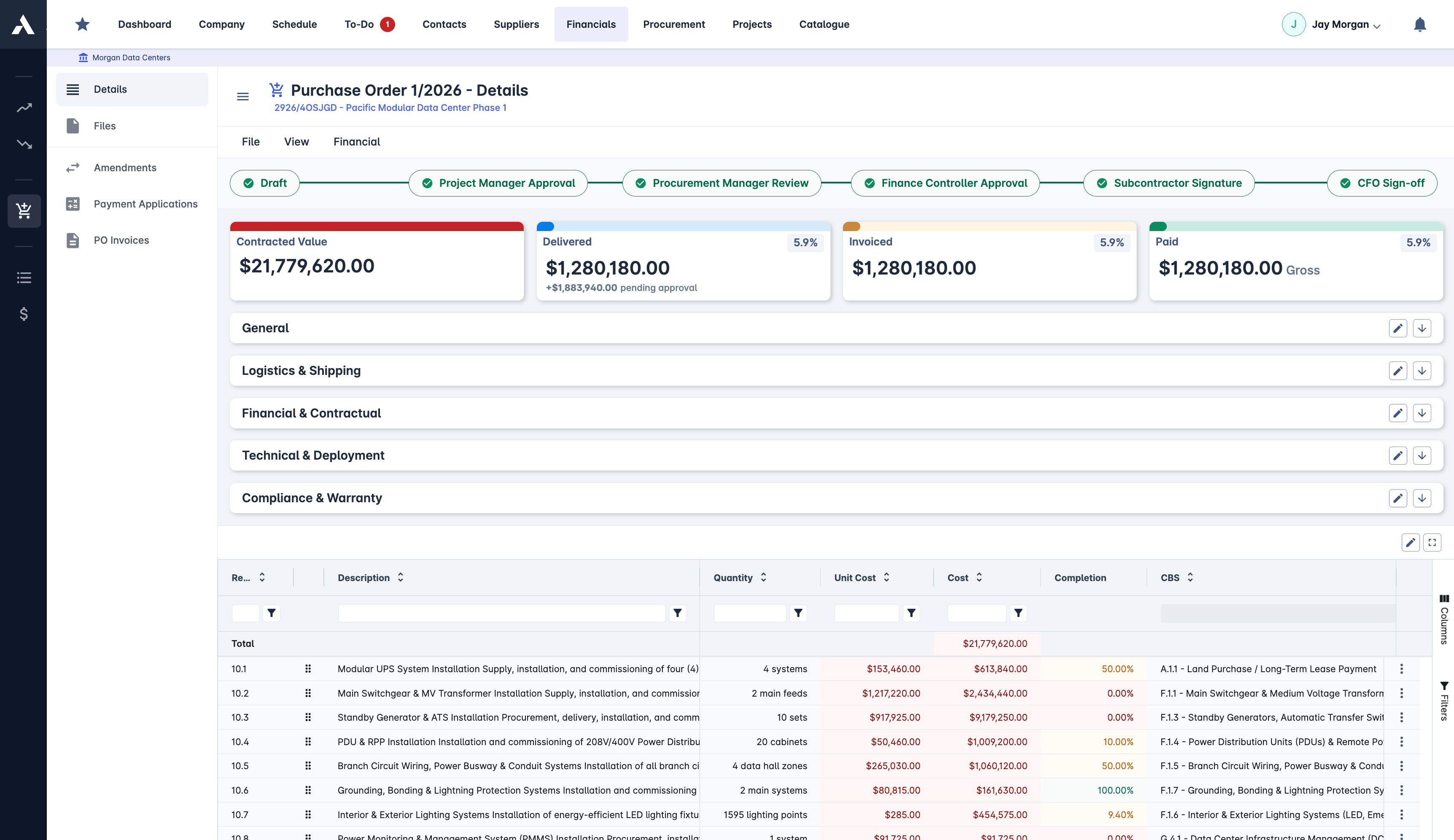
Raise, approve and track every purchase order from requisition to delivery. Each PO commits against its budget line the moment it is approved, not when the invoice lands.
Automated PO generation
Multi-level approval workflows
Budget committed at order time
Cost-value reconciliation and approvals
Subcontractor Management
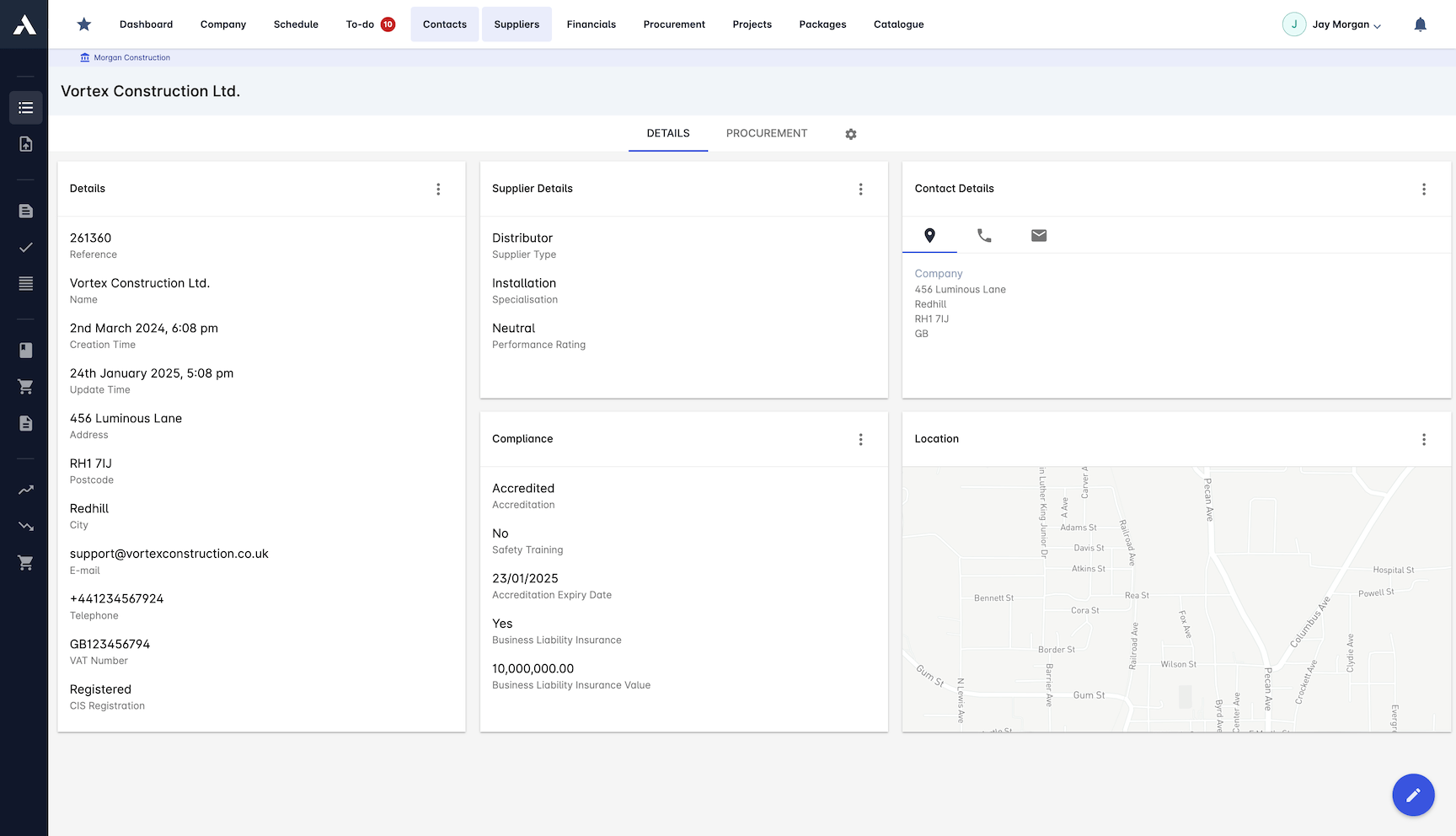
One searchable database of every supplier and subcontractor, with certifications and performance history on the record instead of in a filing cabinet.
Searchable supplier and subcontractor list
Custom meta-data attributes
Performance rating system
Suppliers grouped by trade
Supplier Qualification
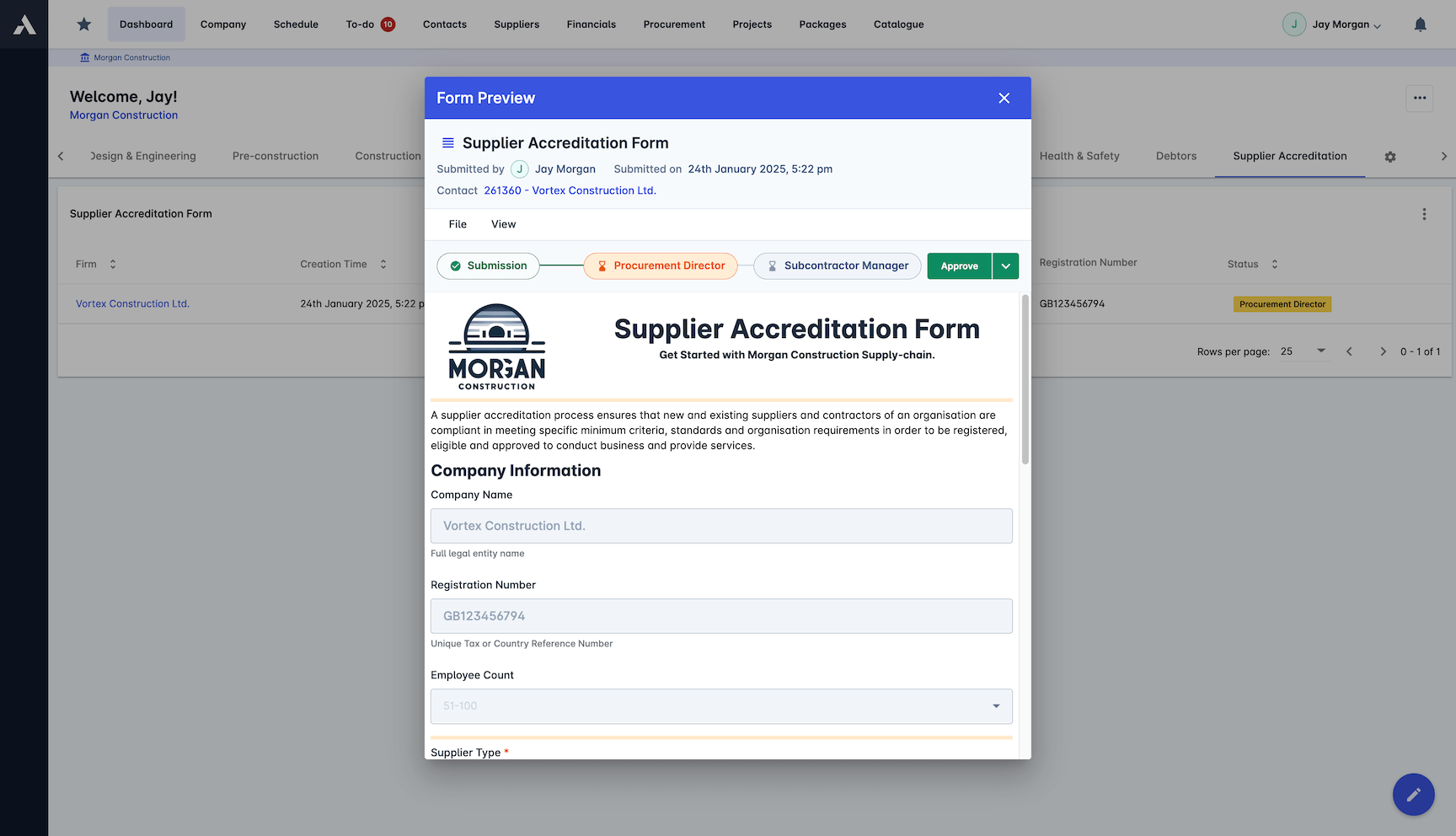
Qualify suppliers before they win work. Accreditation forms, certificates and performance ratings live on the supplier record and stay current.
Custom accreditation forms
Supply chain compliance: insurances and accreditations
Performance ratings tracked over time
Documents and certifications managed
Preferred supplier agreements
Material Management
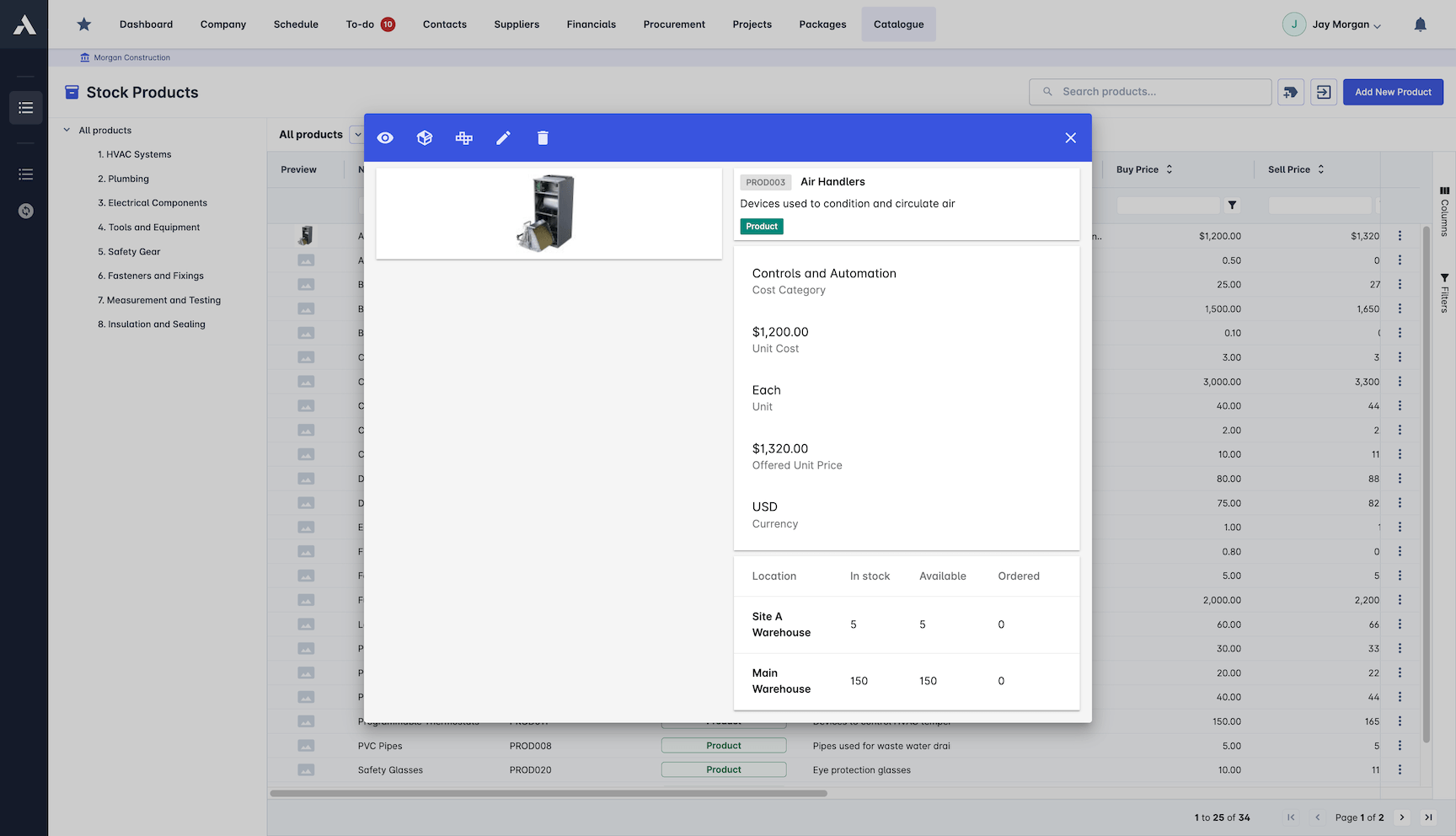
Track materials from order to site. Requirement planning, stock levels and deliveries sit in one place, so the site knows what is arriving and when.
Material and services library
Material requirement planning
Stock levels and deliveries tracked
Site inventory management
Bid Management
Run subcontract bids from RFQ to award in one process. Bids sit side by side, evaluated on a matrix, awarded fairly.
RFQ and RFP generation
Side-by-side bid comparison
Bid evaluation matrix
Compliant with fair bidding standards
One system for procurement and supply chain
The supply chain side of construction procurement is the part spreadsheets lose first: who is on the approved list, whose insurance has lapsed, which orders are due on site this week. Archdesk keeps supplier and subcontractor records, with insurances, accreditations and qualification status, on the same platform as the purchase orders and subcontracts they supply against, and tracks deliveries against the orders they belong to. Committed cost, supply chain compliance and what has actually arrived on site read from one record per project.
Comparing options? See the 15 best construction procurement software tools. The budget lines procurement commits against start life in construction estimating software.
Frequently Asked Questions: Construction Procurement
What is construction procurement software?
Construction procurement software controls committed cost by raising every purchase order and subcontract against a budget line. Spend is visible the moment it is approved rather than when the invoice lands. Archdesk covers the full procure-to-pay cycle: bids and RFQs, contracts, deliveries tracked to site, and invoice matching at the end.
How does Archdesk stop budget overruns in procurement?
Every purchase order commits against its budget line through multi-level approval workflows, so a line that would break the budget is visible before it is approved, not discovered at the audit. Spend analytics and price comparison show where the money goes across projects.
Can we run subcontract bids through Archdesk?
Yes. Subcontract bids run from RFQ to award in one process: bids sit side by side, evaluated on a matrix, in a workflow that meets fair bidding standards.
How does invoice matching work?
Automated three-way matching checks each supplier invoice against the purchase order and the delivery receipt. Discrepancies are flagged automatically, clean invoices move to payment, and costs break down by cost code.
How are suppliers and subcontractors qualified?
Every supplier and subcontractor lives in one searchable database with custom accreditation forms, insurances and certifications, and performance ratings tracked over time, so qualification happens before they win work.
Does procurement feed cost reporting?
Yes. POs, subcontracts and contractor progress draws capture cost as it is committed and work as it is delivered. That feeds budget-versus-actual tracking and CVR (cost value reconciliation) reporting, so your true cost position runs months ahead of the invoices.
Does Archdesk cover construction supply chain management?
Yes, for the supply chain a contractor actually runs: subcontractors and suppliers. Supplier records carry insurances, accreditations and qualification status. Purchase orders and subcontracts track against their budget lines, and deliveries are logged against the orders they fulfill. Who is supplying what, under which terms, stays one live record per project.
How do holdback and lien waivers fit into paying subcontractors?
In Canadian practice, paying a subcontractor runs on the progress draw cycle under provincial lien legislation: holdback is retained and released on statutory timelines, often with lien waivers exchanged along the way. Subcontract commitments, approvals and payment records live on the same project record in Archdesk, so the paper trail sits with the committed cost.
How does Archdesk handle builders lien holdback on subcontracts?
Under Canadian construction contracts, holdback is retained from subcontractor payments until release. Archdesk tracks holdback per subcontract alongside the rest of the commercial record, so balances and release timing stay visible beside the committed cost instead of sitting in a side spreadsheet.
When does a subcontract show up as committed cost?
The day it is approved. Every purchase order and subcontract posts to its budget line at the point of commitment, so the gap between committed and invoiced stays visible per line, months before the invoices arrive.
Does Archdesk integrate with QuickBooks Online?
Yes. Archdesk integrates with QuickBooks Online, so procurement records and the ledger stay in step without double entry and finance keeps its own system.
How do progress draws connect to procurement?
Progress draws sit on the same project records as POs and subcontracts, so drawn, committed and actual positions read together per job and across the portfolio, from the first draw to closeout.
Explore Related Solutions
Everything below runs in the same system, working from the same live data.
Subcontractor Management (SRM)
Manage subcontractors and stay compliant
Subcontractor Progress Draws
Evaluate subcontractor work progress and payments
Subcontractor Bidding
Issue RFQs and track offers from your supply chain
RFIs
Handle subcontractor questions with owners and deadlines
Discover more
Explore the full range of solutions and find the right fit for your business.
See your next project on Archdesk
Book a demo and walk through a fully worked example project: one platform running everything from winning the work to closing it out.
Book a Demo

